Loading...
Loading...
Loading...
Loading...
Loading...
Loading...
Loading...
Loading...
Loading...
Loading...
Loading...
Loading...
Loading...
Loading...
Fairmarkit is the intelligent sourcing platform that empowers organizations to more efficiently purchase the goods and services they need. By equipping procurement and supply-chain teams with automation and data, Fairmarkit promotes competitive bidding while reducing manual work within existing processes.
We’ve enhanced Price Books to better support complex catalog management. We’ve introduced Price Book service catalogs, enabling support for both goods and service catalogs, perfect for rate card demonstrations or service-based sourcing.
Price books now supports both goods and services through the new “type in” feature. You can upload and manage service catalogs alongside goods catalogs—ideal for rate card use cases or sourcing events involving service providers.
Key Benefit: Requesters/Buyers can purchase services and items faster than ever with pre-approved vendors available in the catalogs.
Approval rules now support country/location as a configurable parameter, enabling location-based routing for approvals and workflows. Admins can create if–then conditions that evaluate an event’s location to automatically direct it to the right approvers.
Location-based approvals: Admins can define approval rules using location_countries (e.g., is, is not, one of) to route requests by country.
Key Benefit: Reduces manual triage and ensures events are approved by the appropriate regional stakeholders.
Our BIG update for Intake has some new features available that make creating requests easier for requesters, transforms the item experience, and improves compliance.
Matching requests to catalogs: We transitioned our items service items UI to advanced items management including matching. Based on your initial input, the system will recommend the item or service lines of the request. It will also look to see if there are any catalogs, punchouts or rate cards available to buy off of. You can add or remove any lines as you see fit, browse the suggestions and punchouts to finalize your request.
Dynamic questions + follow up questions: KIT already recommended questions to get comprehensive details about the request, but now KIT creates unique questions based on each line item in the request because not every item required the same information for sourcing.
Improved routing transparency: Based on the routing rules set up for the account, users will now get only get a message, after they fill out the request, if the "proceed with request" property is "false" to let them know what the next steps are. This makes less clicks for the requesters and information when it's truly needed.
eg) If, in the routing rules, the "proceed with request" property is "false", the user would get a message similar to the one below that explains what happened and what the next steps are.
Key benefit: These new functionalities in Intake bring ease of use and compliance to a whole new level. We continue to iterate on ways Intake can bridge the gap between requester and buyers in helpful ways!
Fairmarkit now supports the following languages: Turkish, Thai, and Hindi.
Key benefit: We strive to increase our global footprint and continue to add new language supports so that all our customers have access to the languages they do business in.
Fairmarkit now supports the following languages: Turkish, Thai, and Hindi.
Key benefit: We strive to increase our global footprint and continue to add new language supports so that all our customers have access to the languages they do business in.
We’ve added more flexibility to auction management, allowing customers to make key updates after creating an event but before the auction begins. This improvement helps ensure that auction details stay accurate and adaptable to last-minute changes.
Editing Auctions: Customers can now edit key auction details—such as benchmarks, delivery information, item or service descriptions, decrement values, and ceiling prices—after creating an event and before it starts.
Key benefit: This added flexibility helps users correct mistakes or fine-tune auction parameters without needing to recreate the event, saving time and maintaining workflow efficiency.
RFPs now display all attachments when more than 20 are included, with the option to expand the list using “Show more.”
RFP Attachments:
Users can now view all attachments within an RFP by selecting “Show more” when the list exceeds 20 files.
Key benefit: This makes it easier to verify that every required document is included, improving risk management and ensuring higher quality assurance in the submission process.
RFQ exports now include average bid values and savings percentages, giving teams more complete insights directly in Excel.
RFQ Excel Exports:
All RFQ details, including average bid and savings percentages, are now included when exporting to Excel.
Key benefit: This ensures users have the same visibility in their exported files as they do in Fairmarkit, making it easier to analyze results, share data, and maintain accurate records across systems.
Admins can now choose whether a requester’s name and email are visible on the Quotation Details page.
Requester Contact Information:
Admins can configure the visibility of requester details, allowing suppliers to see the name and email when enabled.
Key benefit: This makes it easier for suppliers to directly reach out with questions or requests for clarification, improving communication and reducing delays in the quoting process.
Suppliers can now add collaborators directly to their received quotation pages. Collaborators can edit and submit bids, making it easier for teams to work together on responses.
Supplier Quote Sharing:
Suppliers can share requests within their company without needing to contact buyers for updates.
Invited collaborators must sign the NDA if the RFQ requires one, ensuring compliance before access.
The event page will now display collaborator contact details and automatically add them as participants in chat.
Key benefit: This streamlines collaboration for supplier teams, reduces back-and-forth with buyers, and enables faster, more coordinated bid submissions.
We’ve expanded Dutch Auction settings to give buyers more flexibility and suppliers a fairer chance to participate. Auctions can now continue until their predefined floor price (regardless of supplier responses). This ensures a consistent competitive window and encourages broader supplier engagement.
Dutch Auction flow refined: Suppliers can still Accept Price at any decrement, but their action no longer ends the auction.
Locked-in supplier commitments: Once a supplier accepts a price, they are confirmed at that level and cannot withdraw or change their offer.
Multiple acceptances enabled: Buyers can gather multiple supplier acceptances at the same price point until the auction closes.
New auction mode – Run to End
Key Benefit: Together, these updates give buyers more decision-making time, reliable supplier commitments, broader competitive coverage, and flexible auction outcomes — ensuring both fairness for suppliers and stronger results for buyers.
are now available on intake.
Once enabled, requestors can access punchout catalogs directly within the Ask KIT workflow. These catalogs link out to suppliers' shopping sites, and any items added to the cart are returned automatically to Fairmarkit for review and submission.
Compliant, Faster POs: KIT intelligently routes applicable requests through punchout catalogs. This keeps all sourcing activity in-platform, streamlining purchase order creation and improving compliance.
Centralized Sourcing: With cXML punchout integration, users can browse and buy from external supplier catalogs directly within Fairmarkit. This unified experience minimizes context switching and combines hosted, standard, and punchout catalogs in one seamless flow.
Key Benefit: Procurement teams rely on user-friendly interfaces to drive adoption and reduce friction in the buying process. By enabling requestors to complete purchases through familiar supplier sites—without leaving Fairmarkit—teams can maintain a seamless experience, ensure compliance with company policies, and centralize all purchase activity within a single system of record. This reduces errors, speeds up purchase order creation, and reinforces procurement governance.
are now available to help streamline intake and sourcing processes in Fairmarkit. These advanced, structured input types let you embed external datasets—like cost centers, GL accounts, or supplier lists—directly into intake flows or RFx forms. With dynamic filtering and intelligent previews, users can confidently select the right entries while maintaining business rule alignment.
Compliant Data Choices: Data fields allow users to select from centralized, curated lists (e.g., cost centers), ensuring submissions reference a consistent source of truth. Dynamic filters adapt options based on metadata such as location or business unit, while structured previews guide users to make informed, accurate selections with ease.
Key Benefit: Procurement teams rely on user-friendly interfaces to drive adoption and reduce friction in the buying process. By enabling requestors to complete purchases through familiar supplier sites—without leaving Fairmarkit—teams can maintain a seamless experience, ensure compliance with company policies, and centralize all purchase activity within a single system of record. This reduces errors, speeds up purchase order creation, and reinforces procurement governance.
We’ve made it easier for collaborators to land exactly where they need to be when accessing an RFQ. Shared links now direct users to the most relevant view—whether they’re editing a draft or reviewing a finalized RFQ—cutting down on unnecessary clicks and confusion.
Sending the Right RFQ Information Based on Status: When you share an RFQ link, collaborators are now taken directly to the appropriate page: the edit screen for drafts or the details view for open, closed, or awarded RFQs.
Key benefit: This smart routing improves efficiency and clarity for anyone reviewing or acting on RFQs, especially in time-sensitive procurement workflows.
Fairmarkit now provides more consistent and insightful savings data. Savings calculations will automatically compare the lowest supplier response to a benchmark—if one is available—or to the average of all responses when no benchmark exists.
Smarter Savings Calculation Logic: The savings calculations are the same as they always have been, now it will just fill in the report column whether or not a benchmark exists.
Key Benefit: This ensures savings insights are always available and based on a meaningful reference point, helping procurement teams measure value and make data-driven decisions even when benchmarks aren't configured.
We’re continuing to enhance auction visibility and control. Buyer logs now capture key supplier activity—laying the groundwork for a more transparent and manageable auction experience in the coming weeks.
Track Price Changes and Supplier Actions: Auction logs now display when suppliers accept pricing increments or exit an auction.
Key Benefit: These insights help buyers better understand supplier behavior in real time, enabling smarter decision-making and more effective auction strategies.
While there are no functional changes this week, we’ve added helpful guidance for teams using Scopes of Work (SOWs) in Fairmarkit.
How to Set Up a SOW Template: A new support article walks you through configuring a SOW template in Fairmarkit. Click to view the documentation.
Key Benefit: This makes it easier for teams to standardize SOW-based sourcing processes, reduce setup confusion, and ensure consistency across complex service engagements.
We’ve expanded our available units of measurement (UOMs), giving customers and suppliers more flexibility to describe products and services accurately in RFX and bids.
New Units of Measurement (UOMs): We’ve added the following UOMs to better support diverse industries and product types:
Unit
Tonne
Part
Kilowatt
Key benefit: Users can now specify quantities more precisely based on their business context, improving clarity in communication and evaluation.
Our new RFQ approval workflow gives organizations tighter control and accountability by enabling rule-based approvals before an RFQ is shared with suppliers or awarded post-bid. Workflows can be customized using business logic such as spend thresholds or role-based conditions.
RFQ Approvals: A powerful new workflow capability that allows organizations to require approval at two key stages—before an RFQ opens to suppliers (Pre-Open Approval) and before awarding bids (Pre-Award Approval).
Key benefits: Helps ensure RFQs are reviewed and validated at the right moments, aligning with compliance requirements and internal processes.
Approvals can be configured using if/then logic and business data such as spend thresholds or categories.
Supports multiple approval structures:
Sequential approvals: Approvers review in a set order (e.g., Manager → Director → VP), ideal for escalating oversight.
Role-based benefits:
Buyers can ensure RFQs meet internal standards before supplier engagement or awarding decisions.
Approvers can review, comment, approve/reject, and delegate or escalate as needed.
System Administrators can tailor workflows to reflect company policies, roles, and thresholds.
Buyers now have the ability to pause an auction; ideal for moments when important updates need to be communicated before allowing further supplier bids. This new control helps ensure transparency and better event management
Pause an Auction: A brand-new feature allowing buyers to temporarily halt bidding on an active auction. Accessible directly from the event page, the new "Pause" option updates the event status, triggers notifications to all suppliers, and displays a visible banner indicating the paused or resumed state. All bids submitted prior to the pause remain intact, and a detailed audit log captures who paused/resumed the auction and when.
Key benefit: This gives buyers flexibility to handle time-sensitive updates or corrections without compromising existing bids or clarity.
Real-Time Supplier Engagement Visibility: We’ve added real-time supplier participation indicators within the event UI for Auctions only.
Improved Bid Decrement and Notifications: Buyers can now apply a minimum bid decrement based on each supplier’s own previous bid, not just the current lead bid.
Enhanced SOW: SOW is now a live, collaborative document where stakeholders can edit, review, and comment in real time—ensuring alignment before publishing or routing for approval.
Template-Driven Compliance: Create SOWs faster and with confidence by selecting from pre-approved templates. Templates are centrally managed in the Admin Center, ensuring consistency and compliance with procurement standards. Buyers can then choose the appropriate template directly in the UI.
Rich Text Editing: Customize your scope with a modern editor that supports bolding, bullet points, tables, headers, and more—allowing you to clearly communicate detailed requirements.
To support consistent logistics terms and streamline sourcing workflows, buyers can now define default Incoterms for each supplier. These defaults are automatically displayed when suppliers respond to events and can be applied at either the event or line-item level, depending on your configuration.
Suppliers can override the default Incoterm per event, offering flexibility while preserving visibility. Buyers will see any overrides clearly flagged in the quote comparison view, improving transparency and reducing the need for manual follow-up. Buyers may choose to make all or some of the incoterms available for selection by the supplier. The full list of available incoterms to choose from are:
EXW – Ex Works
FCA – Free Carrier
CPT – Carriage Paid To
CIP – Carriage and Insurance Paid To
This feature is controlled by a configuration setting. To adjust your settings, contact your Fairmarkit Customer Success Manager. If enabled, suppliers may choose an incoterm from a drop-down for each line item. The incoterm selected will display on each line item in the bid comparison screen
If enabled at the event-level, event- level incoterms will be made available to select by the supplier via dropdown and displayed on the supplier heading in the buyer's bid comparison page
When setting up a Dutch or Japanese auction, end times are now automatically calculated based on your pricing, increment, and interval settings. This eliminates the need for manual entry and makes it easier to review your auction timing
When scheduling your request for quote or auction events, you can now enter specific times (e.g., 3:20) in addition to selecting the predefined 30-minute time options for start, end, and close times. This gives you more flexibility for precise scheduling.
Added the following new unit of measures for service line items.
Reassign supplier contact by name or email
When reassigning a supplier contact on an event, you can now see the supplier's name and email address when selecting. Previously, you could only see their name.
Added delivery day to group & service lines
Added Delivery Days as an optional field for group, service, and group service line items. You will see this on the Details page when reviewing supplier responses.
New UOM - Metric Ton (services)
Added Metric Ton as an available unit of measure for service line items.
See:
New supported languages: Polish and Russian
Fairmarkit now supports Polish and Russian language and localization (number and currency format).
See:
Increased length of webhook URL
When configuring a webhook (), the URL for Webhook can now be up to 200 characters.
SSO via email links
When users access Fairmarkit events via email, if SSO login is enabled, they'll now be directed through SSO authorization (not to the login page) and then redirected to the link destination in the email.
New supported langauges: Polish and Russian
Fairmarkit now supports Polish and Russian language and localization (number and currency format).
See:
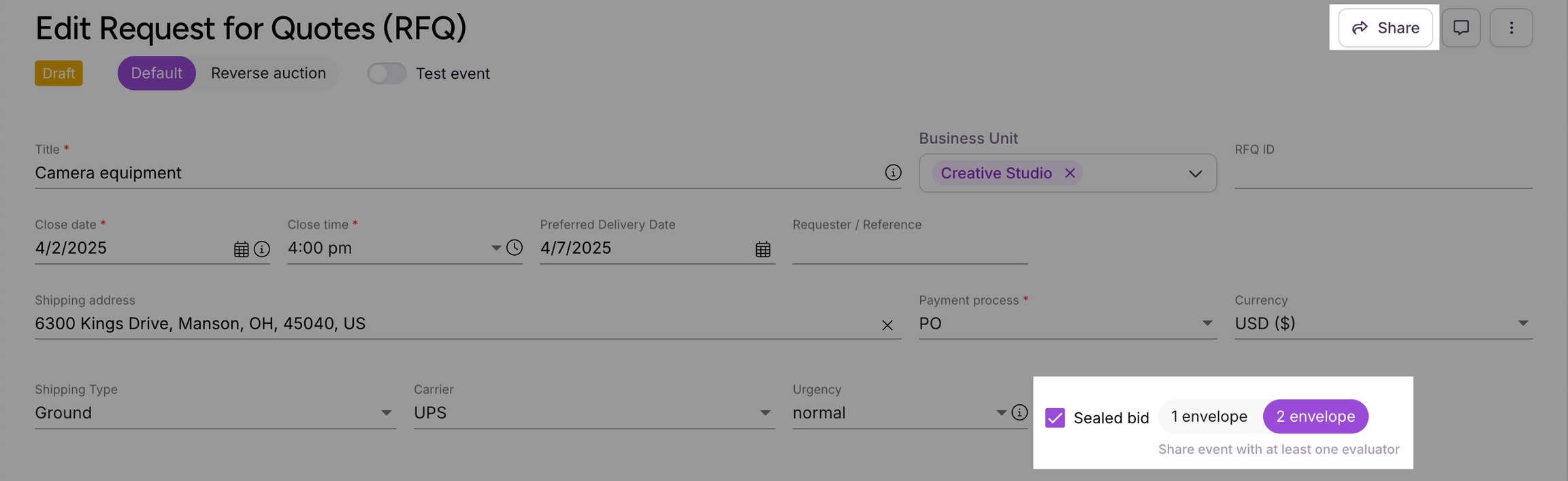
2-envelope sealed bids
You can now choose between one- and two-envelope sealed bids for your RFQ events. With two-envelope bidding, assigned evaluators review supplier responses without seeing pricing. Only the responses they select will move forward for buyers to review pricing and award the event.
To enable 2-envelope sealed bids, contact your Fairmarkit Customer Success Manager.
See:
Intake: Price books
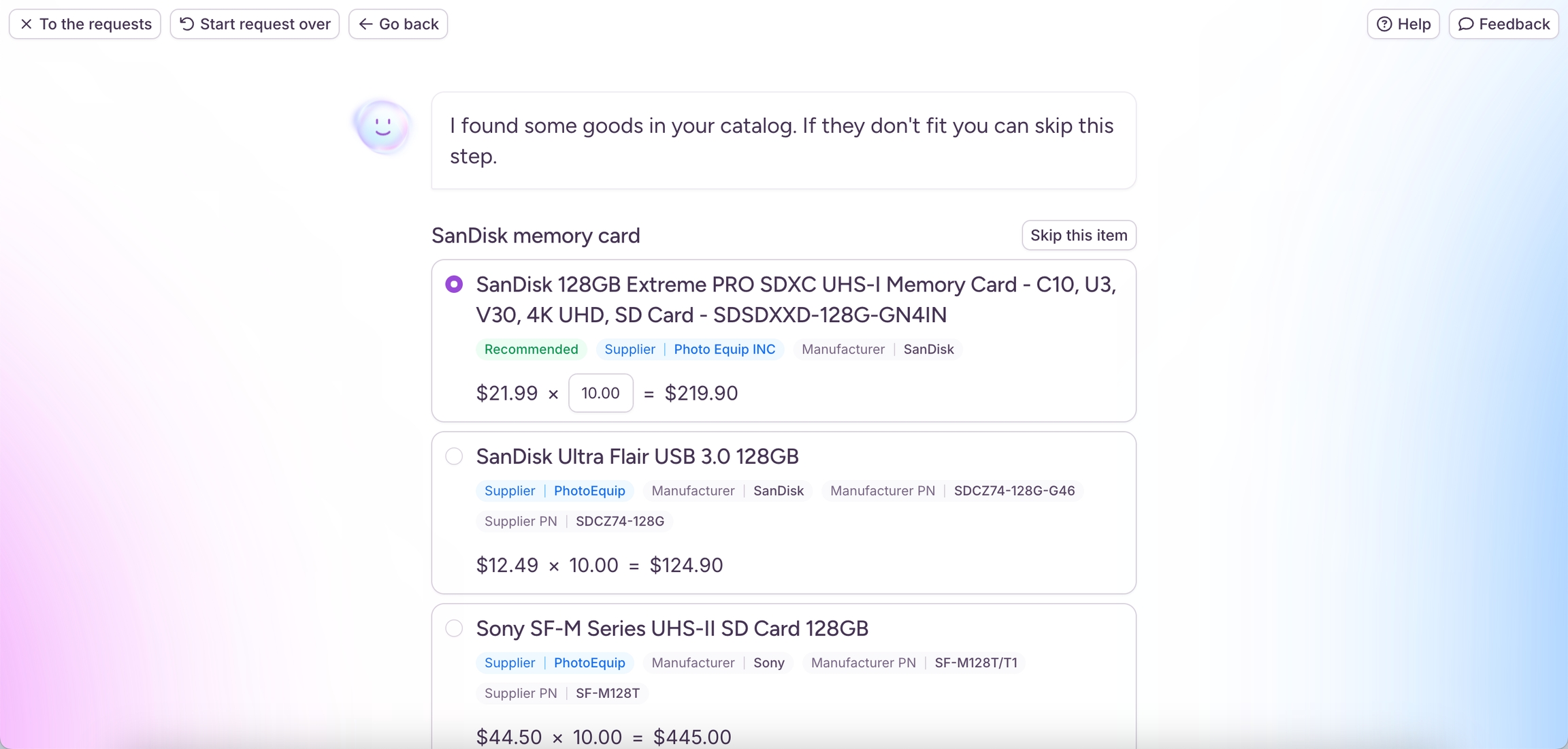
When you request items, Intake now suggests matches from your company’s price books catalogs based on item description, manufacturer, or category. It uses semantic search, meaning it understands the meaning of your request, not just exact words, to find the right items. If all items are matched, the request can be automatically submitted for purchase, helping you move faster while staying aligned with company policies.
See: and
New Configurations
To adjust your configuration settings, contact your Fairmarkit Customer Success Manager.
Archive in Status Filter: You can now filter by Archived status using the Status filter on the Events list. To improve performance, Archived is not selected by default. If you prefer to include Archived automatically, you can enable an optional configuration. The separate Archived filter was removed as part of this update.
Dutch auction multiple winners: Select if multiple suppliers can win a Dutch auction. With this option enabled, you can select a winner from any supplier that accepts the final price.
See:
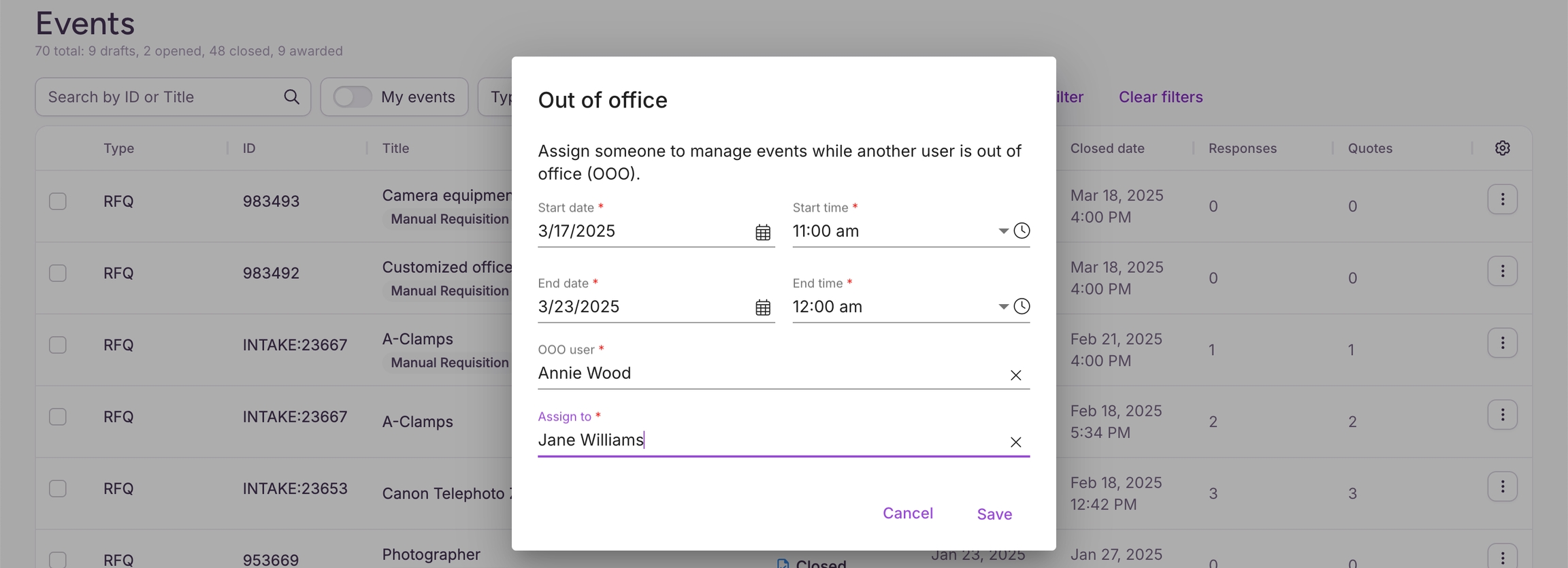
Admins can now set OOO
As an Admin, you can now manage Out of Office (OOO) for users at your company. When a user is unavailable, you can assign another team member to oversee their events. Users can still set their own OOO, but this ensures coverage for those who can’t or may have forgotten.
See:
New supported language: Estonian
Fairmarkit now supports Estonian language and localization (number and currency format).
See:
Improved RFQ List
On your Supplier Portal, you now have an updated RFQ list that gives you better control over managing and reviewing your responses to request for quote (RFQ) events.
Updates include:
Dedicated lists for RFQ and Auction events.
Customizable columns to display the information you need.
Enhanced filtering by Customer, Status, and Urgency, plus an option to view only your events (ideal for Admins).
Sorting options by Title, Close Date, Urgency, and Shipping Location.
See:
New supported language: Estonian
Fairmarkit now supports Estonian language and localization (number and currency format).
See:
New supported langauges: Arabic and Bahasa Indonesia
Fairmarkit now supports Arabic and Bahasa Indonesia language and localization (number and currency format).
See
New supported langauges: Arabic and Bahasa Indonesia
Fairmarkit now supports Arabic and Bahasa Indonesia language and localization (number and currency format).
See:
AI Bid Analysis Agent
The AI Bid Analysis Agent helps you make faster, data-driven decisions by analyzing supplier responses to your events. After generating an analysis, you can chat with the AI agent to ask questions and get more information.
Availability: The AI Bid Analysis Agent is available for closed and awarded events that were created via intake requests in Fairmarkit or the Request API. For information about using the Request API, contact your Fairmarkit Customer Success Manager.
Review AI analysis
Once your event closes, go to the AI Analysis tab on the original intake request to review an analysis of supplier responses. The analysis includes a structured analysis of key details like pricing, delivery timelines, vendor capabilities, and risk assessments.
Ask questions
After reviewing the analysis, click Ask KIT to ask questions, request clarifications, and explore insights directly with the AI agent.
See:
Filter list of available supplier meta tags
When awarding an RFQ event, the list of awarded supplier meta tags can now be filtered, simplifying the selection process. Filters can be configured to handle scenarios where multiple event meta tags are defined for the same key. This update applies only to users utilizing supplier meta tags.
Search by supplier company name or email
When searching a list for a supplier, you can search by the supplier's company name or email.
Change to partially awarded event emails
Previously, suppliers received a "not won" email when an event was partially awarded. Now, suppliers will only receive this email if the event is fully awarded to another supplier, reducing confusion and conflicting notifications.
Change to partially awarded event emails
Previously, you would receive a "not won" email when an event was partially awarded. Now, you'll only receive this email if the event is fully awarded to another supplier.
New auction types: English, Japanese & Dutch
When creating an auction event, you can now choose from three auction types, giving you more flexibility to align your sourcing strategy with your needs:
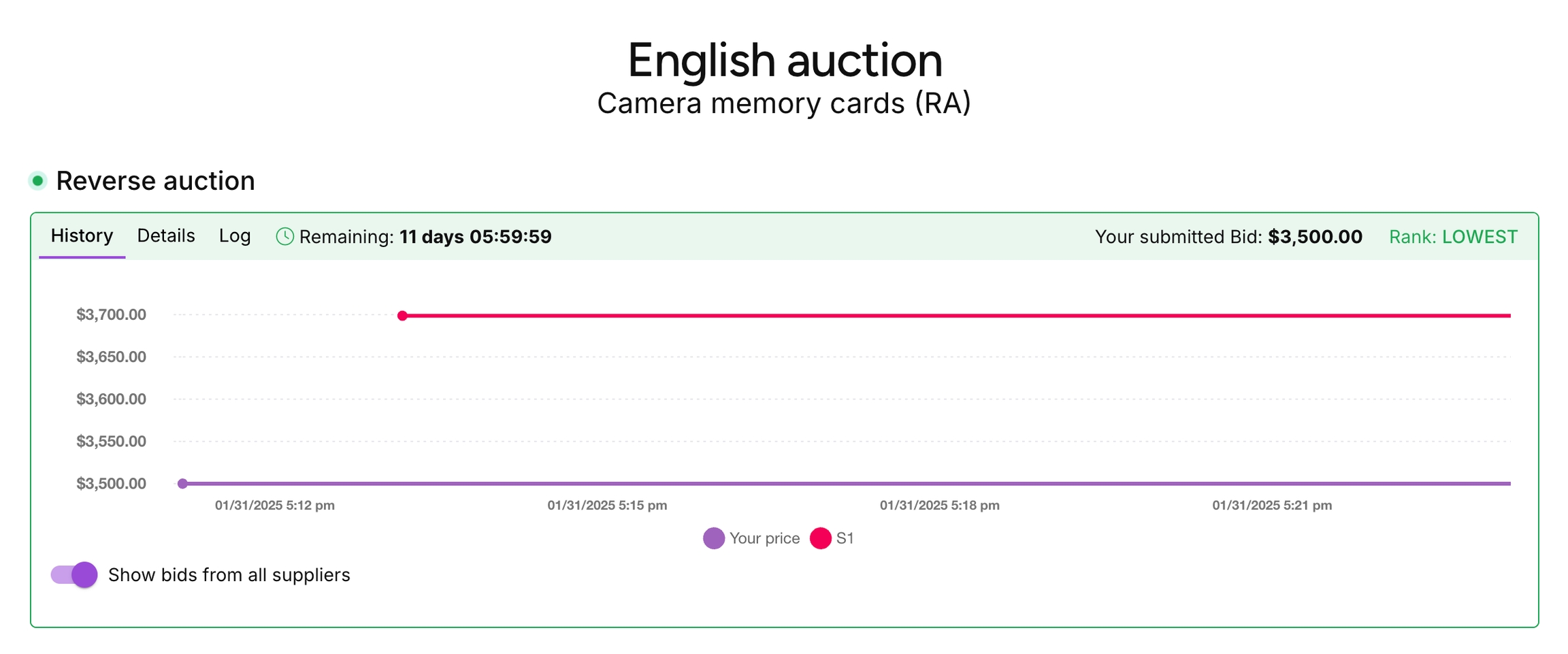
English (classic) auctions
We've renamed the original reverse auction experience to English (classic auctions). With English auction, Suppliers compete by submitting lower prices.
See:
Dutch auctions
With a Dutch auction, your auction price starts low and gradually increases. The first supplier to accept the price wins.
See:
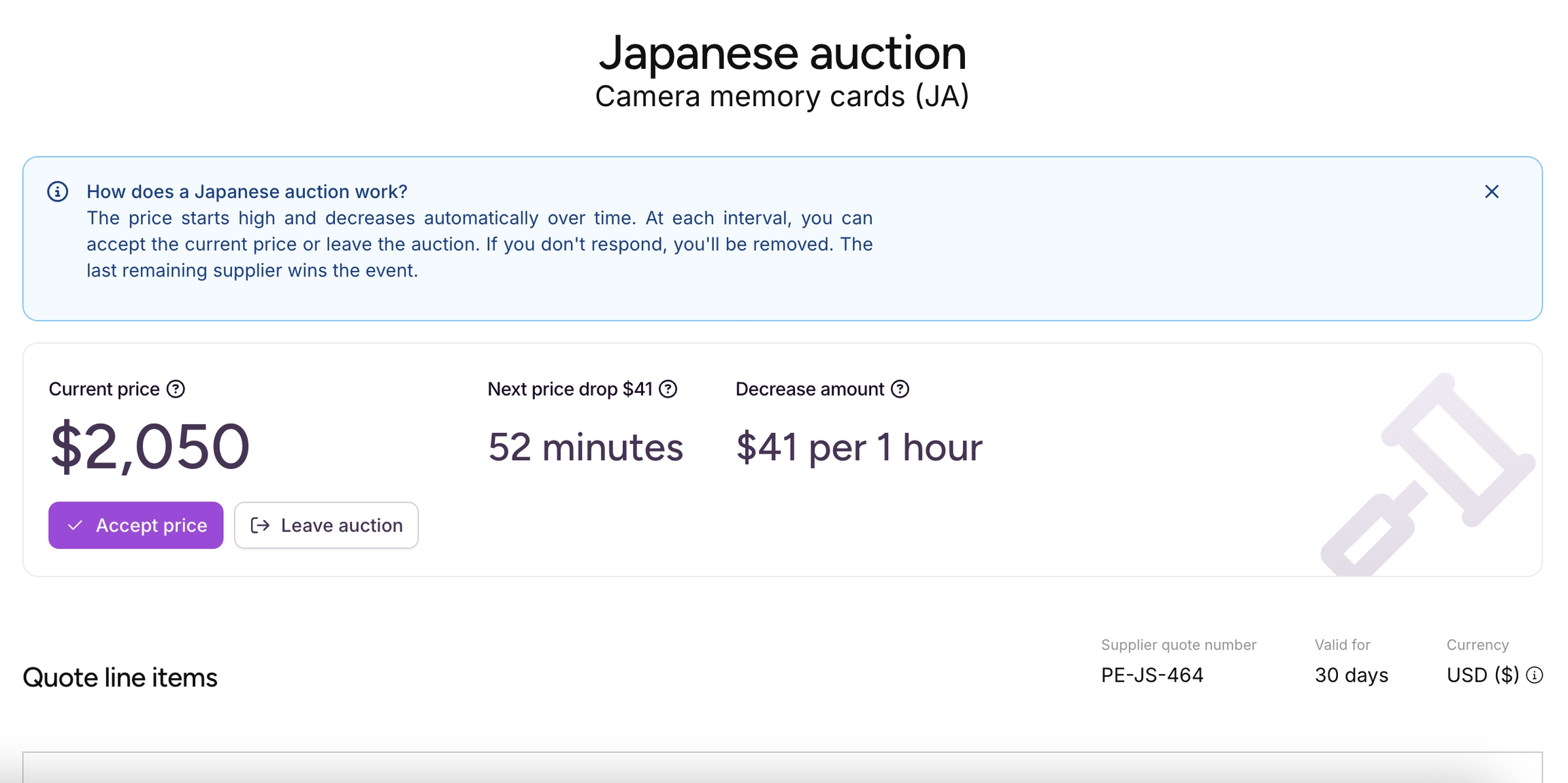
Japanese auctions
With a Japanese auction, your auction starts at the highest price you'll pay and decreases gradually over time. At each decrease, suppliers can choose to stay or leave. The last supplier remaining wins.
See:
English auctions - new settings
You now have access to additional settings for English (classic) auctions. These settings give you greater flexibility and control over your auctions. You can access the new settings from the Auction settings area when you create your event.
Auction extension rules
You can now configure how extensions work when suppliers bid at the end of an auction. You can adjust the following auction settings:
Trigger extension: Set when to extend an auction (e.g., receive a bid in the last 2 minutes).
Extension duration: Set how much time is added (e.g., 30 minutes).
Maximum extensions allowed: Limit how many extensions are allowed.
Auction bid buffers
You can now set a Minimum bid increment as a percentage or fixed amount (e.g., 5% or $10) for your auctions. This ensures bids are meaningful reductions from the current lead bid, promoting fair competition and building trust in the auction process.
See:
Events list improvements
The following improvements help you to quickly sort, filter, and find events on your Events list.
Sort by Title: Added the ability to sort the Events list by the Title column.
Manufacturer filter: Added the ability to filter the events list by Manufacturer.
See:
Improved notification search and filtering
We've enhanced notification search and filtering to help you find important information faster.
Unread filter: Filter notifications to show only unread items.
Search event data: In addition to message text, you can now search notifications by event data.
New auction types - Dutch, English, and Japanese
Buyers can now create three types of auction events, each with a different way for you to participate. For each auction type, the event screen provides instructions on how to proceed.
Dutch auction
The auction price starts low and increases over time. You win if you're the first participant to accept the current price.
See:
English (classic) auction
Compete by submitting lower prices throughout the event. If your bid is the lowest at the end, you win. This is the original reverse auction experience.
See:
Japanese auction
The auction starts at a high price and decreases over time. At each price drop, you'll decide whether to stay or leave. If you're the last participant remaining, you win.
See:
Minimum English auction bid
Buyers can now set a Minimum bid increment, requiring new bids to meet a specified percentage or fixed amount below the current lead bid (e.g., 5% or $10). If your bid doesn’t meet this value, you’ll see an error message and need to update it before submitting it.
See:
English auction extensions
Previously, if you bid on an auction in the final 10 minutes, the auction would extend for 10 minutes, continuing until no further bids were received. Buyers can now configure extensions, controlling when extensions are triggered, how much time is added, and the maximum number of extensions. You’ll receive real-time notifications for extensions so you can respond quickly and stay competitive.
See:
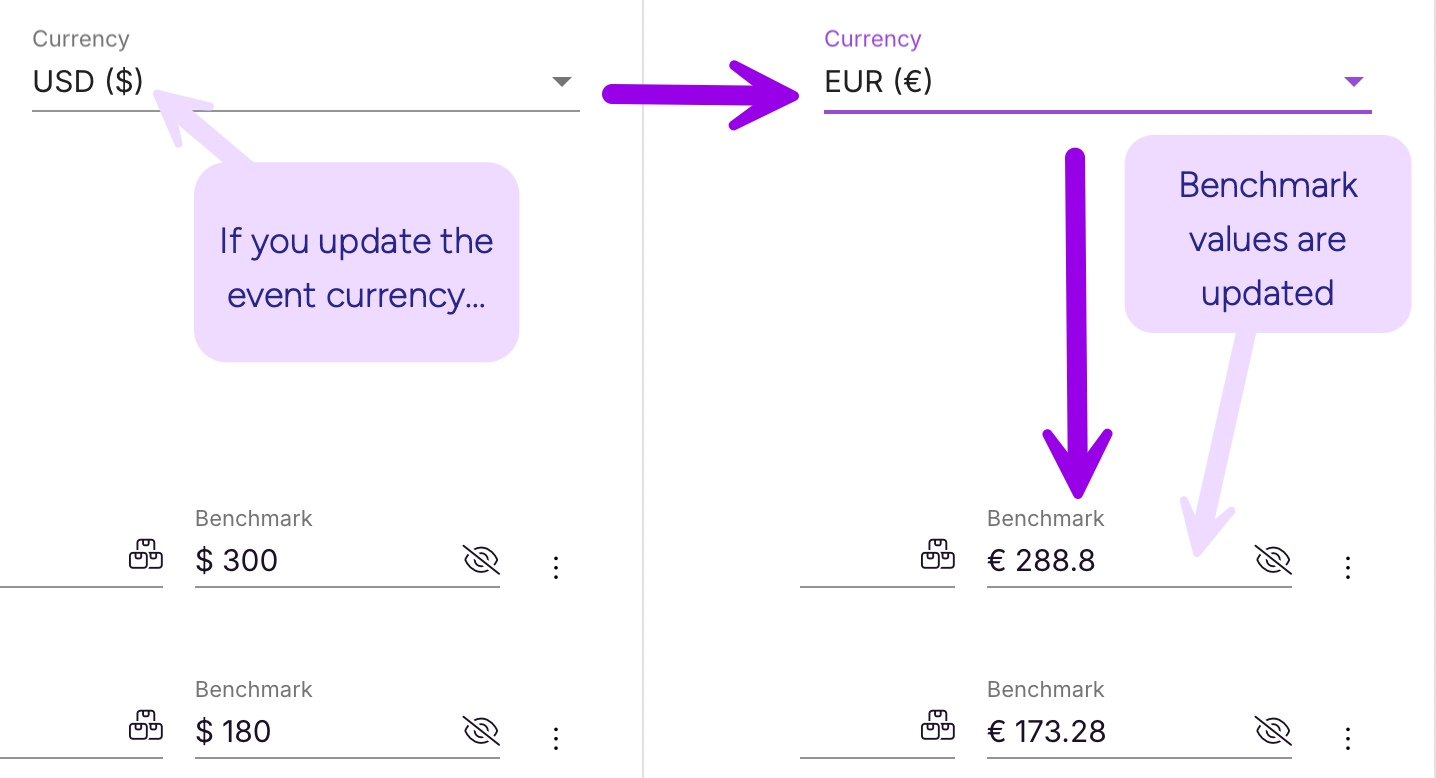
Automatically convert Benchmark when Currency is updated
If you update the currency while working on a request for quote or auction event, any existing Benchmark values will now be automatically converted to the new event currency. You can review and edit the updated value as needed. This option saves time and ensures benchmark values are updated automatically when you change the event currency.
This option is available via a . To adjust your settings, contact your Fairmarkit Customer Success Manager.
See:
Fairmarkit API webhook additions
Added new request for proposal (RFP) webhook notifications for the following:
: With the RFP_OPENED webhooks, you can receive a notification when a request for proposal (RFP) event is opened.
: With the RFP_CLOSED webhooks, you can receive a notification when a request for proposal (RFP) event is opened.
See: and
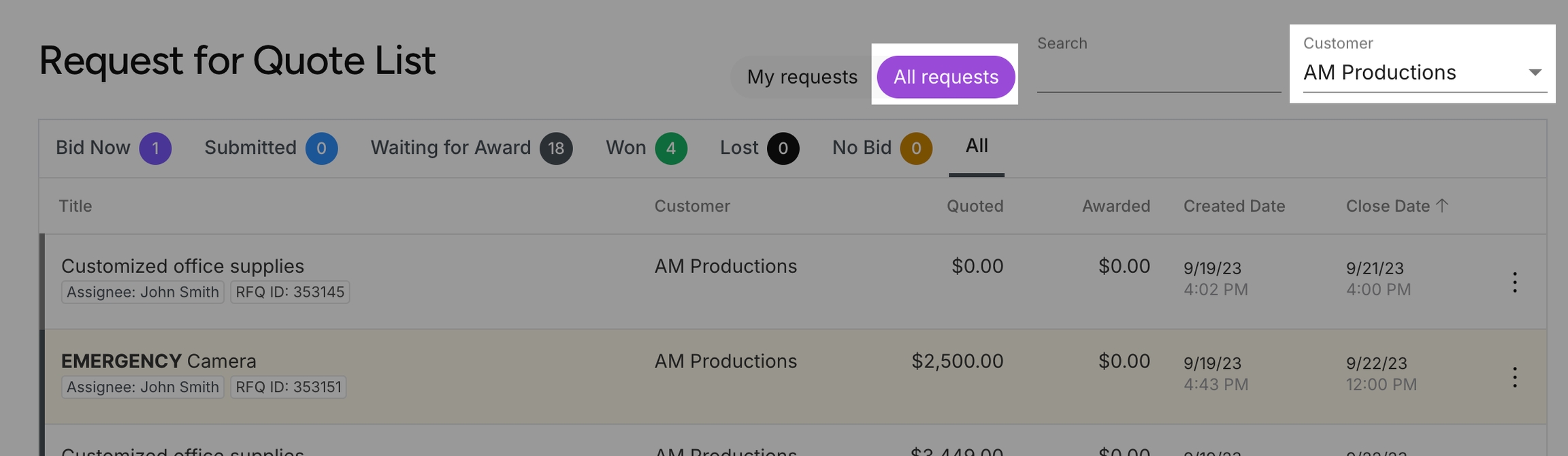
All requests/Customer filter combination
When reviewing one of your events list (RFQ, RFP, RFI), you can now select the All requests option and then filter the list to a specific Customer. This change allows you to have more control over your lists.
See:
Benchmark price from historical data
When you create a request for quote event, the Benchmark price can now be automatically generated based on your historical data. We'll suggest a benchmark price by matching line items using key identifiers (MFG part #, Internal part #, and Description) to previously awarded events and uploaded purchase order line items.
This option is available via a configuration setting. To adjust your configuration settings, contact your Fairmarkit Customer Success Manager.
See:
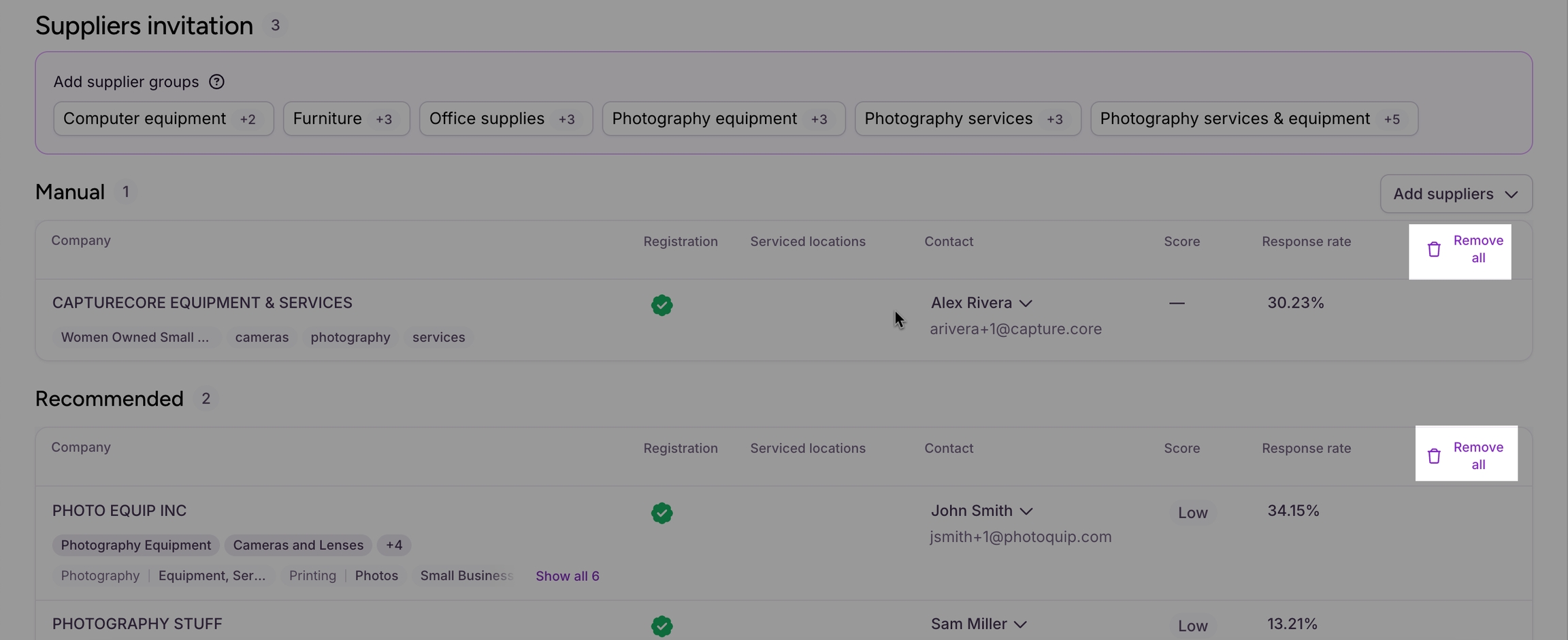
Remove/restore suppliers option
Added a 'Remove all' button to the Suppliers invitation area. With this you can quickly remove all selected supplier invitations from an event.
If If you remove a supplier invitation by mistake, you can restore one or all (new 'Restore all' button) invitations in the Removed Supplier area.
See:
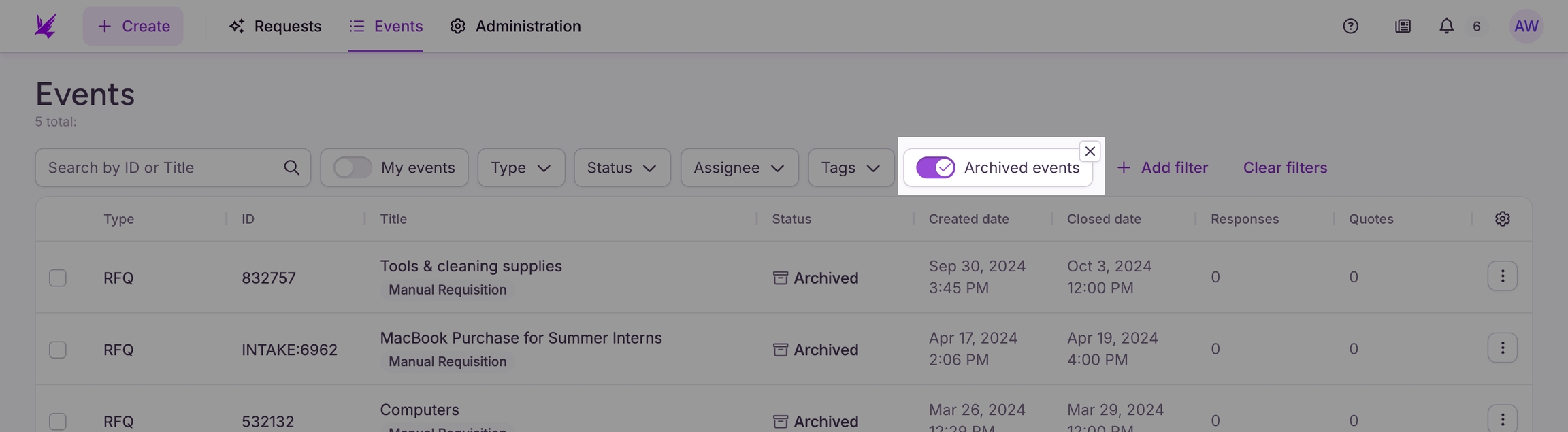
Archived events filter
Added an Archived events filter to the Events list. This is available from the list of available filters. With this change, the Archived option will no longer be available in the Status filter.
See:
Fairmarkit API - Requests
You can now create requests and pull data about a specific request through the Fairmarkit API.
See: and
What's new
Dynamic intake approvals
With intake approvals, your requests can now be automatically routed to an approval process based on rules defined for your company. If the request's location, budget, or currency or the submitting user's role matches a rule, Fairmarkit will send requests to approvers before submitting.
See:
Multi-round event details download
When downloading the details of a multi-round event, the downloaded file will now include information for all event rounds.
See:
View request
When viewing a request for quote (RFQ) event on the details page, you can now select to view the original purchase requisition (PR) (actions menu > View request) in your ERP/P2P purchasing application. This option provides quick access to your purchase requisition, allowing for a better workflow between your event and purchasing application.
See:
New configurations: Set required fields on RFQ events
To adjust your configuration settings, contact your Fairmarkit Customer Success Manager.
Additional required fields on RFQ: Set if the Category, Business Unit, or Requester fields are required when buyers create a request for quote (RFQ) event. By default, these fields are not required.
Require RFQ attachments from suppliers: Set if suppliers are required to add an attachment when responding to an RFQ event. By default, suppliers are not required to add an attachment. See:
RFQ Details dashboard - Tag column
For the RFQ Details dashboard, added an RFQ Tag List column. This allows you to review the tags added to each event quickly.
See:
What's new
Valid for - New selections
When responding to a request for quote event, you can now select 7 days or 45 days as available options in the Valid for field.
What's new
Award between rounds
When running a request for quote (RFQ) multi-round event, you can now select to award line items and send any remaining line items to a new round.
See:
Delete draft rounds
For request for quote (RFQ) events, if you create a new round and change your mind, you can now delete draft rounds from your event.
See:
Reverse auctions adoption dashboard
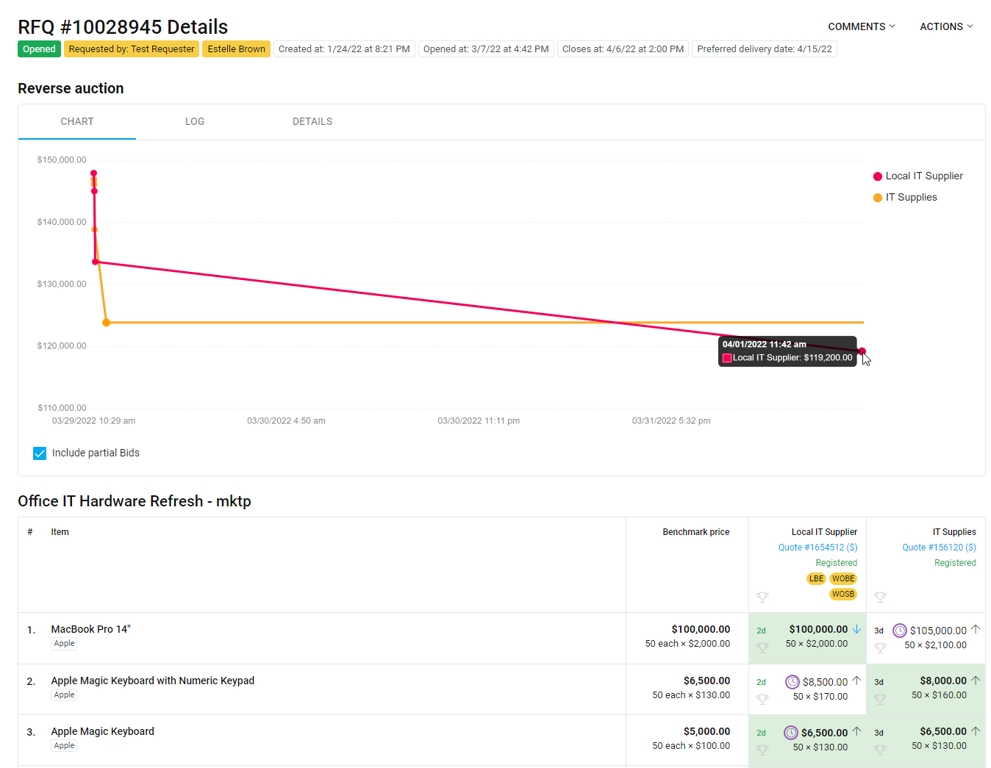
With the new Reverse auction adoption dashboard, you can now review and track your reverse auction activity.
See:
What's new
Reverse auction lowest bid setting
In the reverse auction configurations, renamed the 'Show supplier rank' option to "Show if bid is lowest.' By default, this option will be selected. If not selected, suppliers will not be able to see if their response is the lowest.
See:
New emails
Added three new emails, which can be configured for your company from .
New supplier response When a supplier responds to an event, you will receive a response summary with a link to view details.
See:
Events closing soon When you have events closing soon (within two days), you will receive a reminder with event details or a list of events (if multiple events closing) and a link to view more details
See:
Response not awarded (to suppliers) When you award a request for quote event, suppliers will receive an email update if their response is not awarded.
See:
Email settings: Additional configurable emails
Admins can now select to send alerts and add attachments for the and (suppliers) emails.
See:
What's new
New email: Response not awarded email
When a buyer awards a request for quote event, you can now receive an email update if your response is not awarded.
See:
Use the to view older release notes.
Single Winner: Auction ends when the first supplier accepts the current price.
Multiple Winners: First acceptance sets the price; others can still accept until closure.
Run to End (new!): Auction runs its full duration, collecting acceptances throughout.
Pancake
Milliliter
Cube
DAP – Delivered at Place
DPU – Delivered at Place Unloaded
DDP – Delivered Duty Paid
FAS – Free Alongside Ship
FOB – Free On Board
CFR – Cost and Freight
CIF – Cost, Insurance and Freight
Quick search by event Title or ID.
Words
ASIN
Segments
Annotations lines
Labels
Videos
Pages
Per thousand words


By signing up for a Fairmarkit Case Management account, you can create, review, and reply to support request tickets with the Fairmarkit support team.
Email support: You can also directly email [email protected] to automatically create a request ticket.
Go to the Submit a request page.
Enter any relevant information for your request, and then click Submit. You'll receive an email acknowledging your request. If this is your first request, you might need to create an account password to manage your requests.
Once you've created a request, you are automatically registered for a Fairmarkit case management account. You will just need to create a password for your account.
. We'll create a ticket for you, and you will receive an email acknowledging your request.
Open the email, and click the link. The Sign in to Fairmarkit screen displays.
Click Get a password. The Please set me up with a new password screen displays.
Once logged in, click on your name and select My activities to see the requests you have submitted and review their status.
From the My requests list, click on the subject of your request to open the request and review the history and make any necessary updates.
From a request, you can add new comments and attach files to help aid in the resolution of your request.
Click Add to conversation. The comment field expands.
Enter a comment or attach any helpful files, and then click Submit. The information is shared with Fairmarkit support.
Please don't hesitate to reach out to us at [email protected] with any further questions.
Enter you email and click Submit. In order to receive a password, this must be the same email used to submit your request. You will receive an email to create a password for your account.
Open the email, and click the link. The Choose your secret password screen displays.
Enter you name and password, and click Set password.
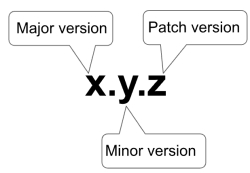
Fairmarkit uses a Semantic versioning scheme that is based on a release number which has 3 components: Major release number, Minor release number, Patch release number.
A Major version release means modifications or enhancements to the same Software product as designated by a change in the Major release number. Major version releases do not maintain backwards compatibility.
A Minor version release means modifications or enhancements to the same Software product as designated by a change in the Minor release number. Major versions maintain backwards compatibility.
A Patch version release means backwards compatible bug fixes are introduced. Patch versions maintain backwards compatibility.
Standard Support includes:
Technical support on the use of the software, and assistance with application configuration.
Fairmarkit will attempt to provide patches for customers upon request, and where technically possible, for the following: S1 issues; Critical Security Vulnerabilities.
Customers may also request patches or fixes for non-S1 issues, although Fairmarkit makes no guarantees about its ability to provide a patch.
Access to product documentation.
Extended Support is provided for products which exist under previous support policies (see below) and can be granted on an exception basis for a product at Fairmarkit’s discretion.
Extended Support includes:
Technical support on and around the software for production environments, including troubleshooting, diagnosis and resolution of issues which do not require source code patches.
Fairmarkit will attempt to provide patches for customers upon request, and where technically possible, for the following: S1 issues; Critical Security Vulnerabilities.
Access to product documentation.
Products that are not covered by Standard Support or Extended Support shall be considered End of Life. End of life support will be provided for an additional 6 months after Standard Support or Extended Support ends. End of Life support will be limited to technical assistance only with no source code patches or new patch level releases. Support will provide recommendations on what is possible for the Customer, including professional services and references to documentation. Patches will not be provided.
After End of Life support expires for a product, Fairmarkit will not provide support of any kind.
Critical Security Vulnerabilities means any vulnerability defined as critical by Fairmarkit according to the following:
For vulnerabilities discovered in third party libraries that are embedded within Fairmarkit’s Software or vulnerabilities discovered in third party software that is in use within Fairmarkit’s Cloud Offerings, the vulnerability will be typically shared and classified for criticality via public advisories, or otherwise identified by scanning tools as part of Fairmarkit’s Vulnerability Management Process (VMP). Fairmarkit evaluates each such disclosure and either accepts or alters (either higher or lower) the criticality based on its internal assessment.
For those vulnerabilities that are ultimately classified as critical (or high), Fairmarkit will update embedded libraries as required, and patch Fairmarkit’s Cloud Offerings as required. The targeted timeline for such updates will be 30 days or less.
For vulnerabilities discovered in Fairmarkit’s Cloud Offerings, Fairmarkit will respond to any incoming report of discovered vulnerabilities from the security research community by evaluating the report and assessing its impact and exploitability, calculating and assigning an appropriate CVSS score. Once the score has been derived, Fairmarkit will determine the appropriate course of action for developing and disseminating a fix. When such a vulnerability is assigned a “high” score (>7.0), Fairmarkit will treat the issue as critical, and where possible, will prioritize the fix ahead of the existing development schedule.
Fairmarkit’s Cloud Offerings use date based versioning. For Fairmarkit’s Cloud Offerings, there is one current version that is supported at all times, for all customers. Upgrades to Fairmarkit’s Cloud Offerings are conducted by Fairmarkit on behalf of all our users. Cloud Offerings are backward compatible.
Fairmarkit’s API uses semantic versioning.
Fairmarkit provides Standard Support for the latest Major version and the latest Minor version of the Fairmarkit API.
Once a Minor version for a Major version is released, the previous Minor of the same Major version will receive Extended Support for 6 months. All new Minor versions are backwards compatible.
Previous Patch versions are obsolete the moment a new patch version is released by Fairmarkit. All new Patch versions are backwards compatible.
It is expected that Customers upgrade Minor versions and Patch versions of the Fairmarkit API periodically to receive enhancements and bug fixes.
Once a new Major version of the Fairmarkit API is released, Fairmarkit will continue to offer Standard Support for the most recent Minor version of the previous Major version for 6 months.
Once a Major version or Minor version of the Fairmarkit API is outside of the Standard support or the Extended Support window, Fairmarkit may offer End of Life Support based on its internal assessment.
To stay updated with product updates, you can expect the following communications. This approach ensures you’re informed, prepared, and supported during and after product releases.
(1 week before the release)
On the Fairmarkit Statuspage (), we post a high-level overview of the upcoming release one week before it is released. This provides you with insight into the release and gives you time to reach out and ask questions.
Subscribe to emails: To ensure you don’t miss an update, subscribe to the statuspage email alerts.
(Day of the release)
On release day, release notes are published to the documentation (docs.fairmarkit.com), highlighting all changes in a release. Additionally, documentation is also available for more information about the features.
A banner linking to the release notes is displayed in the Fairmarkit application to ensure user visibility.
We take a staged rolled-out approach for significant new features and control access with a configuration. This allows you to collaborate with your Fairmarkit team to learn about the feature changes in advance and determine the optimal timing for adoption.
(With release, as needed)
For some new features, in-app onboarding tutorials will be added to guide users through functionality, enabling a seamless transition to the new experience.
(Monthly after the release)
Once a month, you’ll receive an email with highlights of new feature releases for the month and a link to the release notes.
(After release, as needed)
Additional resources, such as webinars or click-through tutorials, may be included for larger releases to provide deeper insights and training.
Error: means any Severity Level S1 error, Severity Level S2 error, Severity Level S3 error or Severity Level S4 error, each as defined in the Error Severity Definition Table below.
Product or Software: means either Fairmarkit’s Cloud Offerings or Fairmarkit’s API, as applicable to Customer’s Subscription.
Online Support: In Platform case management - Fairmarkit allows customers the ability to access support directly from our platform. This allows customers to submit cases at any hour of the day. The customer can set the case priority as well as attach screen captures that will aid in investigation. Updates from Customer Support will result in email alerts to the customer contact email address. When logged into Fairmarkit, simply clicking the “Support” link at the top right of the page will provide the option to open the ticket creation process via the online support portal.
Email Support: Customers may also access support by sending an email to [email protected] any time of the day.
Telephone Support: Fairmarkit support personnel are available by telephone to receive support requests. The phone number for support in the USA is +1-800-558-8017 option 2 unless otherwise directed by your Customer Success Manager.
Urgent
Production System outage
Fairmarkit’s cloud system is unavailable and/or inaccessible, and no workaround is available.
Program is unusable resulting in total disruption of operations. No workaround is available.
High
Major feature/function failure
Operations are severely restricted – Necessary operational tasks cannot be performed.
Major disruption of work in certain parts of the platform; Other platform features are still functional.
No acceptable workaround available.
Normal
Minor feature/function failure
Program does not operate as designed.
Minor impacts on usage of normal business processes are affected.
Acceptable workaround deployed.
Low
Minor Impact
Documentation, general information, general questions, enhancement request, etc. There is no impact on the product’s existing features.
During the Subscription Term, Fairmarkit shall provide Customer with Service Levels consisting of the following: (i) online, email, or telephone support regarding use and deployment of the Product in accordance with the table below; (ii) Major and Minor releases of the same Products licensed by Customer during the subscription (“Maintenance”) and support with respect to Errors as set forth below.
Support is available only in English.
Fairmarkit’s support personnel will (a) verify Customer detected Errors, provided that the Errors can be recreated, and (b) the severity of the support request and whether the support request is an Urgent Severity error, a High Severity error, a Normal Severity error, a Low Severity error or not an Error.
Upon receipt of notice of an Error, Fairmarkit shall assign appropriate technical personnel to the issue and provide Customer with acknowledgement that it has received such Error notice (such actions together, a “Response”). Fairmarkit will use commercially reasonable efforts to promptly resolve each incident. Actual resolution time will depend on the nature of the incident and the resolution. A resolution may consist of a fix, workaround or other solution in Fairmarkit’s reasonable determination.
Fairmarkit will use commercially reasonable efforts to meet the following response targets.
Urgent
2 Business Hours upon receipt of case ticket
Hourly
Inform customer of ticket receival
Satisfactory workaround agreed to by customer and Fairmarkit
Product or system configuration change
Program patch (and incorporated into future release)
High
1 Business Day upon receipt of case ticket
Daily
Inform customer of ticket receival
Satisfactory workaround agreed to by customer and Fairmarkit
Product or system configuration change
Program patch (and incorporated into future release)
Normal
2 Business Days upon receipt of case ticket
Fairmarkit’s obligation to provide Support is conditioned upon the following: (a) Customer makes reasonable efforts to correct the Error after consulting with Fairmarkit; (b) Customer provides Fairmarkit with sufficient information and resources to correct the Error either at Fairmarkit’s customer support center or via remote access to Customer’s site, as well as access to the personnel and any additional software involved in discovering the Error; (c) Customer promptly installs all Minor releases (as defined in the Product Back Support Policy (referred to in Section 1 above); and (d) Customer procures, installs and maintains all equipment, telephone lines, communication interfaces and other hardware necessary to operate the Product.
The following are excluded from Fairmarkit’s Support and Maintenance obligations: (i) Software that is used on or in conjunction with hardware or software other than as specified in the Documentation; (ii) defects in the Software due to accident, abuse or improper use; (iii) any version of the Software for which Support and Maintenance services have been discontinued by Fairmarkit; (iv) any Error caused by third party software not licensed through Fairmarkit; (v) evaluation software or other software provided at no charge.
The following are excluded from Fairmarkit’s Support and Maintenance obligations: (i) failure of, or issues arising from, computing or networking hardware, or equipment or programs under the control of Customer; (ii) negligent or intentional misuse of the Cloud Offerings by a Customer User (e.g., flooding the system with automated emails); and (iii) custom integration scripts that use the Fairmarkit’s APIs.
Customers may elect to use certain billable consulting services (“Consulting Services”) in order to resolve issues associated with Excluded Services. Such Consulting Services may require that Customer complete a network assessment and/or provide Fairmarkit with access to the Customer network, as needed, in order to diagnose the issue.
Fairmarkit’s Cloud Offerings shall be available to Customers not less than 99% of the time each calendar month. For purposes of this Section, Unavailability shall be defined as the inability to access Fairmarkit’s Cloud Offerings either because of (a) the cloud service being completely inaccessible and/or unavailable due to a service downtime, or (b) the inability to login into the service. The availability of Fairmarkit’s Cloud Offerings depends on the subscription tier included in your contract with Fairmarkit.
Notwithstanding the foregoing, The Fairmarkit’s Cloud Offerings are not considered Unavailable under this Section if the Cloud Offerings is Unavailable as set forth in this Agreement as a result of: (a) a force majeure event; (b) regularly scheduled maintenance (of which Fairmarkit shall give at least 48 hours’ notice via https://fairmarkit.statuspage.io/); (c) any causes contributed directly by Customer, its Affiliates or Suppliers/Vendors.
"Monthly Uptime Percentage" for Fairmarkit’s Cloud Offerings is calculated by subtracting from 100% the percentage of 1 minute periods during the month which the Fairmarkit’s Cloud Offering was "Unavailable".
Customer's sole and exclusive remedy, and Fairmarkit’s entire liability, in connection with Software availability shall be that for each period of downtime lasting longer than one hour, Fairmarkit will credit Customer 5% of monthly Subscription Fees (broken out) for each period of thirty (30) or more consecutive minutes of downtime; provided that no more than one such credit will accrue per day.
To receive downtime credit, Customer must notify Fairmarkit in writing within five (5) calendar days from the time of downtime, and failure to provide such notice will forfeit the right to receive downtime credit. Such credits may not be redeemed for cash and shall not be cumulative beyond a total of credits for one (1) week of Subscription Fees in any one (1) calendar month in any event. Fairmarkit will only apply a credit to the month in which the incident occurred. Fairmarkit’s blocking of data communications or other Software in accordance with its policies shall not be deemed to be a failure of Fairmarkit’s to provide adequate service.
As a requester, describe the goods and services that you need, and we'll help you capture the relevant information for your request, helping you to focus on the essential details, and then route your request to your buyer team.
See:
Manage all incoming sourcing intake requests, send a message to a requester, and create Fairmarkit events from requests.
See:
You now have new ways to create your request for proposal events.
Select from a curated collection of templates created in collaboration with SIG to streamline creating your events.
See:
Describe your requirements, and let us generate a personalized list of sections to include on your event.
See:
Import your events from your purchasing application using flat file integration.
See:
Create questions that match your unique needs and adapt to suppliers’ responses, ensuring better responses and easier evaluation.
Introduce suppliers to your events with expanded, formatted text (up to 50,000 characters). Provide essential information and invite suppliers to participate.
See:
Set your question responses, making it easier for suppliers to respond and you to analyze.
See:
Gather comprehensive information by creating conditional questions based on supplier responses.
See:
Add optional questions that allow for flexibility for suppliers.
See:
Improved ways to organize and run your events.
Organized related events into projects for streamlined management. You can link request for quote (RFQ), request for proposal (RFP), request for information (RFI), and reverse auction events.
See:
As needed, you can run multiple rounds for an event. Once closed, you can add a new round, editing the available sections, questions, and invited suppliers. Changes between rounds are tracked in the event log.
See:
You can now choose to seal supplier responses until your event closes. You may need to contact [email protected] to turn on this feature.
See:
You can now invite users within your organization to help you create and edit your events. Depending on their permissions, they can also view and send messages to suppliers and help you evaluate supplier responses. You control their permissions, assigning view-only, edit, or evaluation access to specific events.
See:
You and your team of evaluators can now enter scores on your request for proposal (RFP) and request for information (RFI) events, allowing you to make informed awarding decisions and keep a historical record of your decisions.
For your event, you can:
Set an evaluation period.
Set an evaluation weight for each section, and skip unnecessary sections.
Invite evaluators to your event or a section of your event.
Each Evaluator can:
Set a section score (1 Poor, 2 Fair, 3 Average, 4 Good, or 5 Excellent).
Decline to score a section.
Add comments to each section score.
At the end of the evaluation period, you can review the consolidated scorecard, which ranks supplier responses by score and highlights the highest-ranking supplier response in each section.
See:
Suppliers can now add collaborators directly to their received quotation pages. Collaborators gain the ability to edit and submit bids, streamlining team participation in the bidding process.
Share Bid Requests with Collaborators:
A new “Share” button is available on the Supplier Quotation page.
Invited collaborators with edit access can revise the full proposal and submit bids on behalf of their organization.
If an RFQ requires an NDA, collaborators must sign the NDA before accessing bid details.
Key benefit: This simplifies internal collaboration for suppliers, removing the need to request buyer intervention when adding team members, and enabling faster, more efficient bid submissions.
Incoterms
When you're responding to an event, the buyer may have Incoterms already defined to help guide logistics expectations. You can keep the default value or select a different one from the list, depending on what works best for your response.
New supported langauges: Polish and Russian
Fairmarkit now supports Polish and Russian language and localization (number and currency format).
See:
Improved RFQ List
On your Supplier Portal, you now have an updated RFQ list that gives you better control over managing and reviewing your responses to request for quote (RFQ) events.
Updates include:
Dedicated lists for RFQ and Auction events.
Customizable columns to display the information you need.
Enhanced filtering by Customer, Status, and Urgency, plus an option to view only your events (ideal for Admins).
Sorting options by Title, Close Date, Urgency, and Shipping Location.
Quick search by event Title or ID.
See:
New supported language: Estonian
Fairmarkit now supports Estonian language and localization (number and currency format).
See:
New supported langauges: Arabic and Bahasa Indonesia
Fairmarkit now supports Arabic and Bahasa Indonesia language and localization (number and currency format).
See:
Change to partially awarded event emails
Previously, you would receive a "not won" email when an event was partially awarded. Now, you'll only receive this email if the event is fully awarded to another supplier.
New auction types - Dutch, English, and Japanese
Buyers can now create three types of auction events, each with a different way for you to participate. For each auction type, the event screen provides instructions on how to proceed.
Dutch auction
The auction price starts low and increases over time. You win if you're the first participant to accept the current price.
See:
English (classic) auction
Compete by submitting lower prices throughout the event. If your bid is the lowest at the end, you win. This is the original reverse auction experience.
See:
Japanese auction
The auction starts at a high price and decreases over time. At each price drop, you'll decide whether to stay or leave. If you're the last participant remaining, you win.
See:
Minimum English auction bid
Buyers can now set a Minimum bid increment, requiring new bids to meet a specified percentage or fixed amount below the current lead bid (e.g., 5% or $10). If your bid doesn’t meet this value, you’ll see an error message and need to update it before submitting it.
See:
English auction extensions
Previously, if you bid on an auction in the final 10 minutes, the auction would extend for 10 minutes, continuing until no further bids were received. Buyers can now configure extensions, controlling when extensions are triggered, how much time is added, and the maximum number of extensions. You’ll receive real-time notifications for extensions so you can respond quickly and stay competitive.
See:
All requests/Customer filter combination
When reviewing one of your events list (RFQ, RFP, RFI), you can now select the All requests option and then filter the list to a specific Customer. This change allows you to have more control over your lists.
See:
What's new
Valid for - New selections
When responding to a request for quote event, you can now select 7 days or 45 days as available options in the Valid for field.
What's new
New email: Response not awarded email
When a buyer awards a request for quote event, you can now receive an email update if your response is not awarded.
See:
Use the Release notes archive to view older release notes.





Best-effort communication by Support
Inform customer of ticket receival
Satisfactory workaround agreed to by customer and Fairmarkit
Low
3 Business Days upon receipt of case ticket
Best-effort communication by Support
Inform customer of ticket receival
Product configuration change recommendation
Proper product usage recommendation
Question answered




We're thrilled to introduce a game-changing update designed to make Fairmarkit even more seamless in your procurement workflow.
Simplicity meets power: A simpler, more intuitive user experience tailored to make your life easier while ensuring a quick learning curve.
Efficient: An evolution of familiar features that allows you to achieve more in less time and with fewer clicks.
Seamless workflow: Your workflow, perfected. Updates designed with your needs in mind ensure a streamlined experience supporting your tasks, no matter how complex.
Our redesigned menu ensures a seamless journey through the platform—no more unnecessary clicks—just smooth, straightforward navigation.
With the new Events list, you can manage all your events, from RFP to RFQs, from a single place, saving you precious time and giving you a more holistic view of all of your sourcing events.
See: and
With new list options, you can tailor your Events list effortlessly to suit your workflow and needs. Better manage your events with a new filter design and select from a list of customizable columns—control is at your fingertips.
See:
Functionality meets aesthetics. With our streamlined event management workflow and refreshed brand identity, it's not just a tool; it's an experience.
The screen is now available to all users, and the available tabs are dependent on your assigned role and your company's configuration settings. The , , , Price books, and mmmmmmmmmmmmmmmmm screens are now tabs on the Administration screen.
If you have access, the option is available from the main menu.
By default, you will see your 50 most recently created events. However, you can configure your filters and columns to show the events and data that is the most important to you. Your customizations are saved as you navigate between your list and events. For more information, see .
Of course! From the Events list, your labels, tags, and event urgency will still display as in previous versions of Fairmarkit.
For RUSH and EMERGENCY requests, the appropriate value will appear before the RFQ ID in all caps and bold on the RFQ Detail view. This value will also appear as a tag on the Events list and the Urgency filter can be used to identify requests by their Urgency level.
Yes, your remain the same. You can select one or more events on the Events list and select an action from the menu. Or from the Events list or the event detail page, you can use the actions menu for a specific event. The available list of actions depends on the event's type, status, and your company configuration in Fairmarkit.
Incoterms
To support consistent logistics terms and streamline sourcing workflows, buyers can now define default Incoterms for each supplier. These defaults are automatically displayed when suppliers respond to events and can be applied at either the event or line-item level, depending on your configuration.
Suppliers can override the default Incoterm per event, offering flexibility while preserving visibility. Buyers will see any overrides clearly flagged in the quote comparison view, improving transparency and reducing the need for manual follow-up.
This feature is controlled by a configuration setting. To adjust your settings, contact your Fairmarkit Customer Success Manager.
Calculated auction times
When setting up a Dutch or Japanese auction, end times are now automatically calculated based on your pricing, increment, and interval settings. This eliminates the need for manual entry and makes it easier to review your auction timing
More precise event times
When scheduling your request for quote or auction events, you can now enter specific times (e.g., 3:20) in addition to selecting the predefined 30-minute time options for start, end, and close times. This gives you more flexibility for precise scheduling.
New service line UOMs
Added the following new unit of measures for service line items.
See:
Incoterms
When you're responding to an event, the buyer may have Incoterms already defined to help guide logistics expectations. You can keep the default value or select a different one from the list, depending on what works best for your response.
Reassign supplier contact by name or email
When reassigning a supplier contact on an event, you can now see the supplier's name and email address when selecting. Previously, you could only see their name.
Added delivery day to group & service lines
Added Delivery Days as an optional field for group, service, and group service line items. You will see this on the Details page when reviewing supplier responses.
New UOM - Metric Ton (services)
Added Metric Ton as an available unit of measure for service line items.
See:
New supported languages: Polish and Russian
Fairmarkit now supports Polish and Russian language and localization (number and currency format).
See:
Increased length of webhook URL
When configuring a webhook (), the URL for Webhook can now be up to 200 characters.
SSO via email links
When users access Fairmarkit events via email, if SSO login is enabled, they'll now be directed through SSO authorization (not to the login page) and then redirected to the link destination in the email.
New supported langauges: Polish and Russian
Fairmarkit now supports Polish and Russian language and localization (number and currency format).
See:
Admins can now set OOO
As an Admin, you can now manage Out of Office (OOO) for users at your company. When a user is unavailable, you can assign another team member to oversee their events. Users can still set their own OOO, but this ensures coverage for those who can’t or may have forgotten.
New supported language: Estonian
Fairmarkit now supports Estonian language and localization (number and currency format).
See: Languages and localization
2-envelope sealed bids
You can now choose between one- and two-envelope sealed bids for your RFQ events. With two-envelope bidding, assigned evaluators review supplier responses without seeing pricing. Only the responses they select will move forward for buyers to review pricing and award the event.
To enable 2-envelope sealed bids, contact your Fairmarkit Customer Success Manager.
Intake: Price books
When you request items, Intake now suggests matches from your company’s price books catalogs based on item description, manufacturer, or category. It uses semantic search, meaning it understands the meaning of your request, not just exact words, to find the right items. If all items are matched, the request can be automatically submitted for purchase, helping you move faster while staying aligned with company policies.
New Configurations
To adjust your configuration settings, contact your Fairmarkit Customer Success Manager.
Archive in Status Filter: You can now filter by Archived status using the Status filter on the Events list. To improve performance, Archived is not selected by default. If you prefer to include Archived automatically, you can enable an optional configuration. The separate Archived filter was removed as part of this update.
Dutch auction multiple winners: Select if multiple suppliers can win a Dutch auction. With this option enabled, you can select a winner from any supplier that accepts the final price.
See:
Improved RFQ List
On your Supplier Portal, you now have an updated RFQ list that gives you better control over managing and reviewing your responses to request for quote (RFQ) events.
Updates include:
Dedicated lists for RFQ and Auction events.
Customizable columns to display the information you need.
Enhanced filtering by Customer, Status, and Urgency, plus an option to view only your events (ideal for Admins).
Sorting options by Title, Close Date, Urgency, and Shipping Location.
See:
New supported language: Estonian
Fairmarkit now supports Estonian language and localization (number and currency format).
See:
New supported langauges: Arabic and Bahasa Indonesia
Fairmarkit now supports Arabic and Bahasa Indonesia language and localization (number and currency format).
See:
New supported langauges: Arabic and Bahasa Indonesia
Fairmarkit now supports Arabic and Bahasa Indonesia language and localization (number and currency format).
See:
AI Bid Analysis Agent
The AI Bid Analysis Agent helps you make faster, data-driven decisions by analyzing supplier responses to your events. After generating an analysis, you can chat with the AI agent to ask questions and get more information.
Availability: The AI Bid Analysis Agent is available for closed and awarded events that were created via intake requests in Fairmarkit or the Request API. For information about using the Request API, contact your Fairmarkit Customer Success Manager.
Review AI analysis
Once your event closes, go to the AI Analysis tab on the original intake request to review an analysis of supplier responses. The analysis includes a structured analysis of key details like pricing, delivery timelines, vendor capabilities, and risk assessments.
Ask questions
After reviewing the analysis, click Ask KIT to ask questions, request clarifications, and explore insights directly with the AI agent.
See:
Filter list of available supplier meta tags
When awarding an RFQ event, the list of awarded supplier meta tags can now be filtered, simplifying the selection process. Filters can be configured to handle scenarios where multiple event meta tags are defined for the same key. This update applies only to users utilizing supplier meta tags.
Search by supplier company name or email
When searching a list for a supplier, you can search by the supplier's company name or email.
Change to partially awarded event emails
Previously, suppliers received a "not won" email when an event was partially awarded. Now, suppliers will only receive this email if the event is fully awarded to another supplier, reducing confusion and conflicting notifications.
Change to partially awarded event emails
Previously, you would receive a "not won" email when an event was partially awarded. Now, you'll only receive this email if the event is fully awarded to another supplier.
New auction types: English, Japanese & Dutch
When creating an auction event, you can now choose from three auction types, giving you more flexibility to align your sourcing strategy with your needs:
English (classic) auctions
We've renamed the original reverse auction experience to English (classic auctions). With English auction, Suppliers compete by submitting lower prices.
See:
Dutch auctions
With a Dutch auction, your auction price starts low and gradually increases. The first supplier to accept the price wins.
See:
Japanese auctions
With a Japanese auction, your auction starts at the highest price you'll pay and decreases gradually over time. At each decrease, suppliers can choose to stay or leave. The last supplier remaining wins.
See:
English auctions - new settings
You now have access to additional settings for English (classic) auctions. These settings give you greater flexibility and control over your auctions. You can access the new settings from the Auction settings area when you create your event.
Auction extension rules
You can now configure how extensions work when suppliers bid at the end of an auction. You can adjust the following auction settings:
Trigger extension: Set when to extend an auction (e.g., receive a bid in the last 2 minutes).
Extension duration: Set how much time is added (e.g., 30 minutes).
Maximum extensions allowed: Limit how many extensions are allowed.
Auction bid buffers
You can now set a Minimum bid increment as a percentage or fixed amount (e.g., 5% or $10) for your auctions. This ensures bids are meaningful reductions from the current lead bid, promoting fair competition and building trust in the auction process.
See:
Events list improvements
The following improvements help you to quickly sort, filter, and find events on your Events list.
Sort by Title: Added the ability to sort the Events list by the Title column.
Manufacturer filter: Added the ability to filter the events list by Manufacturer.
See:
Improved notification search and filtering
We've enhanced notification search and filtering to help you find important information faster.
Unread filter: Filter notifications to show only unread items.
Search event data: In addition to message text, you can now search notifications by event data.
New auction types - Dutch, English, and Japanese
Buyers can now create three types of auction events, each with a different way for you to participate. For each auction type, the event screen provides instructions on how to proceed.
Dutch auction
The auction price starts low and increases over time. You win if you're the first participant to accept the current price.
English (classic) auction
Compete by submitting lower prices throughout the event. If your bid is the lowest at the end, you win. This is the original reverse auction experience.
Japanese auction
The auction starts at a high price and decreases over time. At each price drop, you'll decide whether to stay or leave. If you're the last participant remaining, you win.
Minimum English auction bid
Buyers can now set a Minimum bid increment, requiring new bids to meet a specified percentage or fixed amount below the current lead bid (e.g., 5% or $10). If your bid doesn’t meet this value, you’ll see an error message and need to update it before submitting it.
See:
English auction extensions
Previously, if you bid on an auction in the final 10 minutes, the auction would extend for 10 minutes, continuing until no further bids were received. Buyers can now configure extensions, controlling when extensions are triggered, how much time is added, and the maximum number of extensions. You’ll receive real-time notifications for extensions so you can respond quickly and stay competitive.
Automatically convert Benchmark when Currency is updated
If you update the currency while working on a request for quote or auction event, any existing Benchmark values will now be automatically converted to the new event currency. You can review and edit the updated value as needed. This option saves time and ensures benchmark values are updated automatically when you change the event currency.
This option is available via a . To adjust your settings, contact your Fairmarkit Customer Success Manager.
Fairmarkit API webhook additions
Added new request for proposal (RFP) webhook notifications for the following:
: With the RFP_OPENED webhooks, you can receive a notification when a request for proposal (RFP) event is opened.
: With the RFP_CLOSED webhooks, you can receive a notification when a request for proposal (RFP) event is opened.
See: and
All requests/Customer filter combination
When reviewing one of your events list (RFQ, RFP, RFI), you can now select the All requests option and then filter the list to a specific Customer. This change allows you to have more control over your lists.
Benchmark price from historical data
When you create a request for quote event, the Benchmark price can now be automatically generated based on your historical data. We'll suggest a benchmark price by matching line items using key identifiers (MFG part #, Internal part #, and Description) to previously awarded events and uploaded purchase order line items.
This option is available via a configuration setting. To adjust your configuration settings, contact your Fairmarkit Customer Success Manager.
Remove/restore suppliers option
Added a 'Remove all' button to the Suppliers invitation area. With this you can quickly remove all selected supplier invitations from an event.
If If you remove a supplier invitation by mistake, you can restore one or all (new 'Restore all' button) invitations in the Removed Supplier area.
Archived events filter
Added an Archived events filter to the Events list. This is available from the list of available filters. With this change, the Archived option will no longer be available in the Status filter.
Fairmarkit API - Requests
You can now create requests and pull data about a specific request through the Fairmarkit API.
See: and
Quick search by event Title or ID.
Words
ASIN
Segments
Annotations lines
Labels
Videos
Pages
Per thousand words












What's new
Split award a line item
On request for proposal events, if a supplier does not have enough of an item you need, you can split award the line item to multiple suppliers. As part of this change, suppliers can now respond to adjusted quantities when they don't have enough of a requested item.
See:
Adjust final RFP values
You can now manually adjust the final amount and final savings on request for proposal events. The new fields, Awarded amount manual, Highest proposal manual, lowest proposal manual, Projected savings manual, and Identified savings manual are available on the Awarding notes window.
See:
Reverse auction start time
You can now start your reverse auction events 30 minutes after creating the event.
Text wrapping
For events with long item descriptions, questions, or responses, adjusted the text wrapping to make it easier to read and review.
What's new
Change Quantity
When responding to a request for a proposal or request for an information event, if you have less than the requested amount, you can now change the quantity of the line item and respond with the quantity you have available.
See:
Text wrapping
For events with long item descriptions, questions, or responses, adjusted the text wrapping to make it easier to read and review.
What's new
ServiceNow integration
Fairmarkit can be integrated with ServiceNow’s Procurement and Sourcing Operations module as of the ServiceNow Vancouver release. Integrated customers can natively create, launch, and evaluate RFQs from the ServiceNow environment without leaving the ServiceNow user experience.
Integrations
Benchmark prices: Benchmark price will be rounded to 8 decimal places.
S/4HANA update: Going forward, customers using the S/4HANA integration will have the ability (via feature flag) to update draft RFQs if they exist and import newly versioned requisitions with unsourced items from a long-running requisition in S/4HANA.
Peoplesoft update: Going forward, all Peoplesoft customers will be able to sync RFQ line-level categories.
What's new
Added Japanese language and localization support
Fairmarkit now supports Japanese language and localization (number and currency format).
See:
Email language
When sending an email to a supplier, the language will default based on the Supplier's country code. The default language can be overridden based on a user-selected default or if the company sets a different default language.
RFP supplier recommendations improvements
For request for proposal events, instead of relying on the Industry field for supplier recommendations, we are now including event descriptions and headers in RFP supplier recommendations, which improves recommendation quality.
Supplier metadata on quotations
In the Fairmarkit API, you can now access the awarded_supplier_meta_tag on the Quotations endpoint.
Fairmarkit API enhancements
Internal part number: You can now add an Internal part number at the line item level when creating a request for quote event. Similarly, you can also pull the Internal part number when retrieving an RFQ event. Note that the Internal Part Number feature will need to be enabled for your organization.
Internal notes: You can now add internal notes to a request for quote event (event level). You can also pull a list of internal notes for an event.
See:
What's new
Added Japanese language and localization support
Fairmarkit now supports Japanese language and localization (number and currency format).
See:
Email language
Emails from Fairmarkit will now default based on your selected country code. You can override the default by choosing your user-level language or selecting a different company default language.
What's new
Automatic supplier recommendations
Unless you have opted out with your Fairmarkit Customer Success Manager, supplier recommendations are now automatically present on any request for quote events that have come in via integration. Recommendations can still be edited and refreshed at any time before buyers open the event. If you would like to opt out of this functionality, please contact your Fairmarkit Customer Success Manager.
Details download
When a PDF is being generated for download, the Download option is now disabled.
Fairmarkit API - RFP events
With the Fairmarkit API, you can now create request for propoal (RFP) events using a template and query your RFP events.
Fixes
What's new
Save event data with reassign
When a supplier reassigns your event to another contact in their organization, the original Registration Status, External System, External System ID, and Tags are saved with the new record.
What's new
This release includes various enhancements to improve your overall Fairmarkit experience.
Strategic sourcing
For the last six months, we’ve been improving how you approach strategic sourcing, providing a more efficient, engaging, and effective way to create, manage, and evaluate your request for proposal events.
Learn more:
What's new
We've made the following upgrades to improve your overall Fairmarkit experience when managing your events.
New navigation: You can now easily create events, access your Events list, and more from the newly designed top menu.
Events list: With the new Events list, you can now access and manage all your events in one centralized list. Further, you can customize your view with a new filter design and configurable columns for more control. See: and
Updated search and filters: With updated search and filters on the new Events list, you can more easily pinpoint the events you want to review. See:
See:
Share projects
You can now share your with other users, giving them view or edit access to the project.
Projects for Buyers
Buyer and Team Lead users can now create and access . Projects are a collection of events that are part of the same initiative or project.
Template evaluation weights
When , you can now preset the evaluation weights for each section.
Optimizing supplier recommendations
With this improvement, we are more heavily leveraging the confidence score to determine which suppliers to include in the recommendations. Previously, this was configured to show a set number of supplier recommendations (which varied by Customer), but now you will only receive highly-rated recommendations, ensuring they are the most relevant suggestions.
What's new
Updated look
Updated the overall Fairmarkit look with updated branding, including fresh fonts and colors.
What's new
AI Section suggestions
When creating a request for information (RFI) or a request for proposal (RFP), you can now enter a description of what you need and let AI generate a list of suggested sections to add to your event. Once generated, you can review the suggested sections and select which ones to include.
See
Evaluation-only sections
When setting up Evaluation criteria for your events, you can now define evaluation-only sections that will not be sent to the suppliers as part of the event. For example, you might want evaluators to score a supplier's response rate as part of your evaluation.
See
What's new
Data load
As an Administrator, you can now upload supplier and purchase order data to Fairmarkit via CSV files. Using a Fairmarkit template, you can upload your data, and Fairmarkit will process the file, creating and updating valid data. Once complete, you can review the upload process. If there were errors during the process, you can roll back changes or download the error file, correct the errors, and then upload your corrected file.
See
Fairmarkit templates powered by SIG
When creating a request for proposal or request for information event from a template, you can now select from a collection of templates that Fairmarkit partnered with SIG to create. You can find the new templates on the Templates list. Each template has a Fairmarkit provided label.
Available templates include:
Facilities Maintenance - MRO Products & Services
General Legal Services
IT Infrastructure Management Services
IT Services Staffing
Event enhancements
Share events: You can now share events from all statues.
Messaging for Observers & Collaborators: Users with the Observer and Collaborator user roles can now see messages related to their events.
Evaluation & scoring enhancements
Add Evaluators: You can now add Evaluators to an event during the evaluation period.
Evaluation reminder: If an Evaluator hasn't scored an event, a reminder email is sent 24 hours before the event closes.
Grainger integration account linking by location
If you're using the Grainger integration, you can now link your account number to a location, ensuring that you receive the correct pricing and availability for your account.
See
Interested in ? Contact your Fairmarkit Customer Success Manager.
Fixes
What's new
Projects
With Projects, you can now create a collection of events that are part of the same initiative or project. In each project, you can add request for quote (RFQ), request for proposal (RFP), request for information (RFI), and reverse actions events.
See
RFP Sealed bids
When sending a request for proposal or request for information event, you can now select to seal any supplier responses (bids) until after the event closes.
Category levels
For line item categories on request for quote events, you can now define up to four levels of categorization.
Fairmarkit API
Added a new Business Units endpoint and enhancements to the RFQ and Supplier endpoints.
RFQ
Store additional information about events in meta_tags and events and line items in external_data.
Added shipping_type and carrier on the event level.
Set business_unit using UUID when creating an event.
Once an event is awarded, you can now set the purchase_order_id.
Supplier
Store additional information about suppliers in meta_tags and external_data.
Business Unit
You can now list, create, retrieve, update, and delete business units with a new endpoint (/api/v3/business-units/).
Integrations
SAP Ariba draft update: We now offer a configuration to update draft events in Fairmarkit if requests have been updated in SAP Ariba.
Coupa authentication: Coupa has fully transitioned to using OAuth credentials, and the ability to use API tokens has been removed.
What's new
Multi-round events
Added the ability to run multiple rounds for your request for proposal and request for information events. Once your event is closed, you can add a new next round, editing the available sections, questions, and invited suppliers. Changes between rounds are tracked in the event log.
See:
Saved list filters
When you apply filters to the events list pages, your filters are now retained between sessions.
Integrations
Improvements
RFQ endpoint version: Updated to a newer RFQ endpoint version to improve performance.
ERP system can be blank: There will no longer be an error if an ERP system is not defined for an RFQ import.
Comments in SAP Ariba: To eliminate duplicate comments, comments will not be posted when pushback fails and is run again.
What's new
Multi-round events
Buyers can now submit their request for proposal or request for information events for multiple rounds. When receiving a multi-round event, the event is tagged, and the round number displays at the top of the response page. Any of your previous responses will be available, and you'll only need to respond to new sections and questions, which will be marked with a New tag.
Convert UOM in Excel Import
When using the Excel Import for request for proposal and request for information events, you can convert and use your own UOM on responses.
Fixes
What's new
Evaluation and Scoring
With Evaluation and Scoring, you and your team of evaluators can now enter scores on your request for proposal (RFP) and request for information (RFI) events, allowing you to make informed awarding decisions and keep a historical record of your decisions.
For your event, you can:
Set an evaluation period.
Set an evaluation weight for each section, and skip unnecessary sections.
Invite evaluators to your event or a section of your event.
Each Evaluator can:
Set a section score (1 Poor, 2 Fair, 3 Average, 4 Good, or 5 Excellent).
Decline to score a section.
Optionally, add comments to each section score.
At the end of the evaluation period, you can review the consolidated scorecard, which ranks supplier responses by score and highlights the highest-ranking supplier response in each section.
See:
Auto-generated supplier recommendations
If you generate Fairmarkit events via an integration, you can now choose to generate supplier recommendations when importing request for quote events into Fairmarkit automatically.
To turn on this feature, contact your Fairmarkit Customer Success Representative.
Integrations
Improvements
Improved integration performance.
Fixes
If a buyer company supplier is linked to a different supplier profile, all messaging conversations from the original profile are now transferred and available to view from the new profile.
What's new
Unseal bids option
For request for quote events where the Sealed Bid option was selected, you will now have an option to Unseal Bids. Previously, sealed supplier responses were automatically unsealed when the event closed, but by providing this option, you can control when you're ready to view the responses and reopen the event if needed without unsealing the responses.
See:
Integrations
Improvements
Improvements to help stabilize the SAP Ariba integration.
Improved logging for stakeholders.
PDF integration enhancements.
Fixes
What's new
Site UOM
Added "Site" as an available service UOM for request for proposal and request for information events.
Fixes
Integrations
Flat file PDFs
For request for quote events, added the ability to send a PDF file with the event response information and the awarded response to your purchasing application when using flat file integration.
SAP Ariba
Integration performance: Improved integration performance to optimize rate limiting on ORP API.
Auto-approve archived events: If a request for quote event was previously archived, it will be auto-approved in SAP Ariba.
Reducing Comments: If an update is skipped, it will now be tracked in the Business Logs and will not be sent as a comment in SAP Ariba.
Pushback comments
SAP S/4HANA
Improved SAP S/4HANA integration performance via improved caching efficiency.
Peoplesoft
Added retry and backoff logic for 409 errors when pushing to Peoplesoft.
Additional integrations enhancements
Update package versions to enhance security.
Updated the UOM remappers.
Removed blank log statement.
Internal enhancements to supplier processing.
Fixes
Corrected an issue where pushback would fail if a request for quote event was withdrawn and a withdraw note was not added.
Fixes
Corrected grammatical errors on the Email Preferences screen. SRP-3739
What's new
Out of office
As a buyer, you can now mark yourself as out of the office, defining the period you will be out, and then delegate another user to manage your events while you're away.
See:
Withdraw request for proposal events
If you have an opened request for proposal or request for information event and need to make major changes, such as adding line items, changing quantities, etc., you can withdraw the event within 2 days of opening it. Withdrawn events are moved back to Draft status and can be edited like a new event. When you withdraw an event, any supplier responses are removed and the suppliers are notified that you've withdrawn the event. After you've edited the event, you will need to open the event again. Once you withdraw an event, it cannot be undone.
See:
Request for proposal question categories
You can now add customer category and subcategory to your request for proposal events at the event or question level. For now, this is an optional configuration; contact [email protected] to enable this configuration. You can only enable this at the event or question level.
Additional Supplier.IO business classifications
The following Supplier.io business classifications can now be selected for suppliers:
Hubzone Small Business (HUB)
Airport Concessions Disadvantaged Business Enterprise (ACDBE)
Committee for Purchase from People Who Are Blind or Severely Disabled (ABILITYONE)
Minority Supplier Development China (MSDC)
Fixes
Integrations
SAP S/4HANA Improved Intake
Intake improvements for pulling requisitions will allow more visibility into the process for SAP S/4HANA integrations.
Integration performance
Improved integration performance via caching queries.
Fixes
Fixes
What's new
Withdraw request for quote events
If you have an opened request for quote event and need to make major changes, such as adding line items, changing quantities, etc., you can withdraw the event within 2 days of opening it. Withdrawn events are moved back to Draft status and can be edited like a new event. When you withdraw an event, any supplier responses are removed and the suppliers are notified that you've withdrawn the event. After you've edited the event, you will need to open the event again. Once you withdraw an event, it cannot be undone
See:
Reopen line items
For partially awarded request for quote events, you can now reopen line items that were not awarded and submit them to suppliers for responses.
See:
Supplier self-certification labels
You can now see a supplier's manually added certifications on your request for quote events.
Updated supplier info card
You can now view a supplier's supplier.io and manually added classifications when viewing their information on supplier recommendations.
Reverse auction duration
Previously reverse auction events had to be open for at least three hours. Now, reverse auction events only need to be open for 30 minutes.
What's new
Withdraw request for quote events
If buyers need to make major changes, such as adding line items, changing quantities, etc., they can now withdraw a request for quote event within 2 days of opening it. When they withdraw the event, you will receive a notification that the event is no longer open, and if you responded, your response is deleted.
Self-certification labels
Buyers can now see your manually added certifications on their request for quote events.
Updated supplier info card
Buyers can now view your supplier.io and manually added classifications when viewing your company information.
Fixes
What's new
Test request for quote events
You can now create test request for quote events. This allows you to run a simulated event without sending emails to suppliers or impacting usage reports.
For Analytics, request for quote events and responses will now include a flag to mark if it was a test event. The new “Test Event” filter has been set to “No” on all standard dashboards. When you flag an event as being “test”, it will not show on reports and dashboards as long as this filter is set.
See: .
Design drop-down questions for templates
You can now create drop-down questions on your templates. With drop-down questions, you can control the responses, making it easier for you to analyze and for suppliers to respond to your events.
See: .
Edit request for proposal events
You can now edit select fields when your request for proposal or request for information events are in Opened, Closed, or Awarded status. For more information, see .
You can edit the following fields in each status:
Opened: Event title, Event description, Client company, Currency, Department, Project name, Event justification, Value of event, Projected savings, suppliers (add or invite), Benchmark, and Internal tags.
Closed: Value of event, Projected savings, Benchmark, and Internal tags.
Awarded: Benchmark
Added Portuguese language and localization support
Fairmarkit now supports Portuguese (Brazil) language and localization (number and currency format).
SSO login redirect
When you use SSO and click a link to access a page in Fairmarkit, authentication will redirect you to the original page.
What's new
Added Portuguese language and localization support
Fairmarkit now supports Portuguese (Brazil) language and localization (number and currency format).
Fixes
What's new
Design drop-down questions
You can now create drop-down questions on your request for proposal and information events. With drop-down questions, you can control the responses, making it easier for you to analyze and for suppliers to respond to your events.
See: .
Edit request for quote events
You can now edit select fields when your request for quote events are in Opened, Closed, or Awarded status. For more information and a list of fields that can be edited, see .
You can edit the following fields in each status:
Opened: Title, RFQ ID, Client Company, Preferred Delivery Date, Requester / Reference, Payment process, Currency, Benchmark, Internal Tags, Urgency, supplier invitations (add), and Marketplaces (select, but not remove)
Closed: Title, RFQ ID, Client Company, Payment process, Benchmark, and Internal Tags
Awarded: Benchmark
Supplier certifications
You can now search for suppliers with matching business classifications across their supplier.io fields, the Fairmarkit business classification fields, or the supplier's onboarding. When searching or viewing a supplier recommendation, a label is added to each result to display the source for their business classification (e.g., supplier.io).
Supplier information
When viewing a supplier's information, you can now review the following information when defined: name, logo, company website, company description, and supplier tags. Additionally, you can see details on why the supplier was recommended; this includes match reason (Title, Category, or Manufacturer), your company's interactions with the supplier (number of times invited, response rate, and number of times awarded), and interaction data from other companies who chose to share their data.
Search by event ID
When you search for an event, you can now find the event by either the Fairmarkit ID or the External ID. This enhancement will make seeing the relationship between original and bundled events easier.
Update Value of event
When awarding a request for proposal event, you can now edit the Value of event field.
Email for rush events
When a supplier responds to an event where you selected Rush or Emergency, you will now receive an email notification. These emails are sent based on an optional email setting that you can select in .
Request for proposal details status updates
The request for proposal Details page will now automatically update once every minute to ensure you see the latest event status.
Fixes
You can now successfully save a draft request for quote event after updating your list of supplier recommendations.
Fixes
What's new
Collaboration Tools for request for quote events
Collaboration tools are now available for Request for Quote (RFQ) events. You can now invite users within your organization to help you create and edit your events. You can assign collaborators view-only access or edit access to your events via the share button.
Manage collaborators
You can now add, remove, and manage your list of collaborators on your events.
See .
Filter duplicate responses
Fairmarkit can now identify and filter out duplicate responses. If two or more suppliers with the same domain (xyzcompany.com) quote on the same request for quote event for the same amount, the second response received or the one not awarded will be marked as a duplicate. Duplicates can be filtered out of dashboards and reports or can be shown.
Line item categories
You can now define categories and subcategories at the line item level for your events. You can set line item categories from the Additional Information area on a line item. For now, this is an optional configuration; contact [email protected] to enable this configuration. When enabled, the event-level categories are not displayed.
Bundling Improvements
Archived events: Archived events will now be labeled, so you can identify the events that were archived when bundling.
Automatic title: When events are bundled, the first event name will be set as the bundled event name
Event log update: You can now view the event log for a bundled event to view the IDs of the individual events that were included in the bundle.
Fixes
Update the Marketplace labels
What's new
List sorting
From your Request for proposal list, if you sort a column, all empty columns will stay at the end of the list when sorted in ascending or descending order.
Declined - Submitted at value
All events included on the Declined status filter will now display a Submitted at value.
Fixes
The Past Quote window will now only include results with a matching Title, Manufacturer, and UOM.
What's new
Template conditional questions
For event templates, you can now create conditional questions, allowing you to gather additional details for review. With conditional questions, you can ask suppliers to answer additional questions based on their answers to a question. For example, if you define a yes/no question, you can require suppliers to include a reason why when responding No.
For more information, see .
Import conditional questions
When importing questions from Excel, you can now create conditional questions to gather additional details for review.
Reassign pending events
When events are in Pending status, you can now reassign the event to another buyer with approval permissions.
Enhanced award experience
With the awarding message windows, you will now have a more straightforward and concise way to award your events.
Fixes
What's new
Collaboration tools
Collaboration capabilities are now available for Request for Information (RFI) and Request for Proposal (RFP) events. You can now invite users within your organization to help you create and edit your events. You can manage their permissions by assigning view only access or edit access to users via the share button within your event.
See .
Fixes
All suppliers will be able to access Messaging.
What's new
Conditional questions
For request for information and request for proposal events, you can now create conditional questions, allowing you to gather additional details for review. With conditional questions, you can ask suppliers to answer additional questions based on their answers to a question. For example, if you define a yes/no question, you can require suppliers to include a reason why when responding No.
Excel export: On your Excel export file, you'll now see a Condition column, which will allow you to note how the condition is set, and a Condition Value column, which defines the value or date needed for the condition.
For more information, see .
New UOM options
Added the following new .
Items/group line items: added Lot, Lump Sum, and Kiloliter.
Service/group service/service component line items: added Lump Sum.
Client Company Name dimension
For Analytics, added the Client Company Name dimension to the RFQ table in Requests for Quotation. This allows you to report based on specific clients.
Flat file integration: Import requests for proposals
With flat file integration, you can now import request for proposal events into Fairmarkit from your purchasing application.
For more information about importing your events, see .
Removed UNSPSC
Removed the UNSPSC field from line items on all event types.
Fixes
What's new
Conditional questions
Buyers can now create conditional questions on request for information and proposal events. With conditional questions, they can ask you to answer additional questions based on your answers to a question. For example, if you answer no to a yes/no question, you could be required to include a reason why you responded No.
Excel export: On your Excel export file, you'll now see a Question Conditions column, which will explain when you need to answer a conditional question, and a Conditional Question column.
Fixes
What's new
Templates - optional questions
On your templates, you can now add optional questions for suppliers. This allows you to define questions that may not apply to all suppliers.
Reassign events
You can now give buyers the ability to reassign events. Reassignments are tracked in the event log.
Buyers: If you're part of a team, you can reassign your events to any team member, an organization supervisor, or an organization admin with this permission. If your organization doesn't use teams, you can reassign events to any buyer within your organization.
Team leads: As a team lead, you can now reassign events for members of their team. This permission will be granted when a you're assigned as a team lead.
To update the reassignment setting, see the Enable buyers RFQs reassigning and Enable buyers RFP reassigning options in .
Restrict approval
Updated the approval permission to restrict users from approving their events. However, if there is only one buyer for the organization, the buyer can approve their events.
Increase Quantity decimal places
When adding a Quantity to a line item, you can now enter values with up to 2 decimal places (e.g., 1.25 acres).
Required event value
When creating a request for proposal or request for information, the Value of Event field is now required.
Fixes
When an opened request for proposal event is viewed, the list of invited suppliers is now included.
Fixes
Responses to request for proposal events can now be resubmitted after a line item has been converted.
What's new
Optional questions
On your request for proposal events, you can now add optional questions for suppliers. This allows you to ask questions that may not apply to all suppliers.
With the addition of optional questions, removed the option to mark questions as No Bid. Suppliers will still be able to decline an entire event. If an optional question has a partial response, it will display as "No Response."
Event cover letters
For request for proposal events, you can now add a detailed description, which acts as a cover letter to your events. You can enter expanded, formatted text (up to 50,000 characters), allowing you to send an introduction that suppliers can read before responding to your event.
UOM change tracking
When a supplier changes a UOM on an event response, you can now track their change in Fairmarkit and when their responses are exported to Excel or PDF.
For request for quote and request for proposal events, made the following changes:
Details page: Added a tooltip with the formula used to convert the values.
Excel export: For each supplier response, you can now see the quoted Quantity and UOM value, and a comment highlights any changed values.
PDF export: Added information with the converted values.
Team lead approval
For events that require approval, team leads can now approve events for their team members.
Note: By default, all team leads will have approval rights for their team, but as needed, an Admin can remove the permission from individual users.
File name limit
When uploading a file, the file name can now be up to 255 characters.
Fixes
What's new
Event cover letters
Buyers can now send expanded, formatted cover letters for request for proposal events. With this, you can read an introduction to the event before you begin your response.
Optional questions
On your request for proposal events, Buyers can now send you optional questions. Previously, all questions were required to complete your response, allowing you to respond more quickly to the questions relevant to your response. If you only include a partial response to an optional question, it will display to buyers as "No Response."
Supplier log in with buyer company SSO
Suppliers belonging to a Buyer company that use SSO can now log in to Fairmarkit.
Fixes
What's new
New Team Lead Permission
Now, administrators can assign a Team Lead to a buyer team. A Team Lead has permission to edit events and manage templates created by members of their assigned team. Previously, only Administrators or Supervisors could perform these actions, so this additional role provides more flexibility to allow Team Leads to manage their teams without needing access to all events within the organization.
For more information, see and .
Event-specific NDAs for templates
You can now add event-specific NDAs to your templates. When creating your template, you can select the company-defined NDA or add a custom NDA via upload or plain text.
For more information, see .
Reorder template sections
When working on a template, you can now reorder and reorganize your question sections.
Actions menu reorder
To make the actions menu more efficient, the Create a Template option was moved with other similar options in the menu.
Send events to Marketplace by default
Now, as an Admin, you can select a Company preferences option to select the Marketplace checkbox by default when creating an event. Once selected, buyers can still deselect the Marketplace checkbox when creating an event.
For more information, see and .
Fixes
What's new
Profile reminder
As an Admin, if your supplier profile setup is not complete, you will now see a daily reminder that prompts you to complete the profile.
Fixes
Updated look: Updated the overall Fairmarkit look with updated branding, including fresh fonts and colors.
Legal Services - Finance
You can now download attachments from supplier responses.
Improved performance by changing how External Ids are searched and updated using the Get Buyer method.
National Veterans Business Development Council (NVBDC)
National Gay and Lesbian Chamber of Commerce (NGLCC)
US Small Business Administration (SBA)
National Minority Supplier Development Council (NMSDC)
Women Business Enterprise National Council (WBENC)
Disability India (IN)
Minority Supplier Development UK (MSDUK)
Corrected an issue where Observers could access the Close and Reopen actions for request for quote events.
PR-682
Corrected an issue where the loading icon would move on the Events list after some actions.
PR-893
Corrected an issue with selected columns on the Events list. If a column was deselected, it was not displayed at the bottom of the available column list.
PR-900
Corrected an issue where events were not appropriately filtered on the Events list.
PR-908
Corrected an issue where cloned events were grayed out on the Events list.
PR-913
Request for quote responses with awarded line items will now be in Awarded status.
PR-256
The Comments section will now display for canceled events.
BEXP-2782
Added an error code for when a purchasing organization is missing.
FUSEIMPL-564
By default, the buyer pipeline will only update partial buyer fields instead of the entire record.
FUSEIMPL-657
To eliminate authorization errors, reduced cache time.
FUSEIMPL-711
When you select not to bid on a line item, the Additional quantities and More information options will no longer display.
SRP-347
If the same certification comes from different sources, it will display as a single label.
SRP-3570
Clarifications emails will now include the name of the buyer who posted the clarification.
SRP-3657
You can now add a decimal value when the UOM is Percent.
SRP-651
On new events, Delivery days will not have a default value.
SRP-912
Supervisors and Admins can now update a buyer's role even when they have pending events
SRP-871
The Marketplace search correctly works when you've also filtered the list by multiple categories.
SRP-2744
Because most issues are better resolved via email, removed the Support phone number from the application and the notification emails you receive from Fairmarkit.
SRP-3472
On the Request for proposal list - Awarded tab, the Submitted at value is now displayed properly.
SRP-3535
You can now add a Diversity certificate and change the type, and it will be saved correctly.
SRP-3543
Buyers will now see certificates with an expiration date on the current date.
SRP-3545
If you attempt to access an event without logging in, a window will now display information about registering.
SRP-2990
Long file names will now be truncated on the screen.
SRP-3312
If an admin is invited to a request for proposal with another supplier from the same company, they will no longer be able to see the other user's response values on their event screen.
SRP-3313
Observers can no longer change or assign Requesters on request for quote events.
BEXP-2009
Users will now see their selected default language and localization preferences when they log in.
BEXP-2286
When the bid currency is changed, the Total amount will now display with your chosen currency.
SRP-655
For historical bids, the Suggested Price button will no longer display if a historical bid was submitted under a different UOM.
SRP-1041
The confidence score is now correctly set for suppliers added to a request for quote event during automated sending.
BEXP-1664
You can now search by name for users created via SSO.
BEXP-1927
The 'nda_updated_at' and 'nda_updated_by’ fields are now updated when an company NDA is changed by the Buyer, Admin, or Superadmin.
BEXP-1939
For request for proposal Descriptions or NDAs, nested ordered lists will now have unique numbering from their parent list.
BEXP-2123
When an item is imported from Excel with the $0.00 value, it is interpreted as a free bid line item.
SRP-886
The correct price is displayed on the confirmation window when the primary item is no bid, and an alternative item is free.
SRP-1111
On the proposal page, the Download All button is now working to download all attachments.
SRP-2475
The Valid for field will now default to "30 days."
SRP-3076
Long Internal Tag text will now be displayed within the tab borders.
BEXP-195
If you copy a SKU or download files for a closed event, the supplier response will no longer be selected for awarding.
BEXP-210
When a supplier declines to bid on an event, you will now be able to view all information that the supplier includes about why they are not bidding on the event.
SRP-2629
The Search bar remove button is now consistent across Fairmarkit.
SRP-645
For request for proposal events, you can now submit a response when you select No Bid for service line item with an attachment UOM.
SRP-2864
For Reverse Auction events, you can now submit a quote when the language is not EN-US.
SRP-2867
What's new
Dynamic intake approvals
With intake approvals, your requests can now be automatically routed to an approval process based on rules defined for your company. If the request's location, budget, or currency or the submitting user's role matches a rule, Fairmarkit will send requests to approvers before submitting.
See:
Multi-round event details download
When downloading the details of a multi-round event, the downloaded file will now include information for all event rounds.
See:
View request
When viewing a request for quote (RFQ) event on the details page, you can now select to view the original purchase requisition (PR) (actions menu > View request) in your ERP/P2P purchasing application. This option provides quick access to your purchase requisition, allowing for a better workflow between your event and purchasing application.
See:
New configurations: Set required fields on RFQ events
To adjust your configuration settings, contact your Fairmarkit Customer Success Manager.
Additional required fields on RFQ: Set if the Category, Business Unit, or Requester fields are required when buyers create a request for quote (RFQ) event. By default, these fields are not required.
Require RFQ attachments from suppliers: Set if suppliers are required to add an attachment when responding to an RFQ event. By default, suppliers are not required to add an attachment.
See: Confi
RFQ Details dashboard - Tag column
For the RFQ Details dashboard, added an RFQ Tag List column. This allows you to review the tags added to each event quickly.
See:
What's new
Valid for - New selections
When responding to a request for quote event, you can now select 7 days or 45 days as available options in the Valid for field.
What's new
Award between rounds
When running a request for quote (RFQ) multi-round event, you can now select to award line items and send any remaining line items to a new round.
See:
Delete draft rounds
For request for quote (RFQ) events, if you create a new round and change your mind, you can now delete draft rounds from your event.
See:
Reverse auctions adoption dashboard
With the new Reverse auction adoption dashboard, you can now review and track your reverse auction activity.
See:
What's new
Reverse auction lowest bid setting
In the reverse auction configurations, renamed the 'Show supplier rank' option to "Show if bid is lowest.' By default, this option will be selected. If not selected, suppliers will not be able to see if their response is the lowest.
See:
New emails
Added three new emails, which can be configured for your company from .
New supplier response When a supplier responds to an event, you will receive a response summary with a link to view details.
See:
Events closing soon When you have events closing soon (within two days), you will receive a reminder with event details or a list of events (if multiple events closing) and a link to view more details
See:
Response not awarded (to suppliers) When you award a request for quote event, suppliers will receive an email update if their response is not awarded.
See:
Email settings: Additional configurable emails
Admins can now select to send alerts and add attachments for the (buyers) and (suppliers) emails.
See:
What's new
New email: Response not awarded email
When a buyer awards a request for quote event, you can now receive an email update if your response is not awarded.
See:
What's new
Email settings
With Email settings, Admins can now select the Fairmarkit email alerts sent from the company and add email attachments to specific email templates.
Turn emails on/off: Select the emails to send from the company. This includes emails sent to buyers and suppliers during events. Users can still update their individual notification settings for the available emails in Notification Settings.
Add attachments: For each email template, you can add up to 5 attachments that will always be included when the email type is sent.
See:
Change quantities on open/closed RFQ events
Added the ability to change line items quantities when a request for quote event is in opened or closed status. This option is available via an optional configuration. There may be editing restrictions and approvals needed based on your integration. Once an event is updated, you'll have to option to notify suppliers.
To adjust your , contact your Fairmarkit Customer Success Manager.
See:
Events list - Quotes column
Added Quotes as an available column to the Events lists. The Quotes column displays the number of full quotes to an event in contrast to the Responses column which also includes quotes and no bid responses.
See:
What's new
Reopen last round
You can now reopen the last closed round in a multi-round event.
See: and
Save RFQ response
When working on responses to request for quote events, supplier's responses will be auto-saved in draft status. If a supplier edits an existing response, the response will display as grayed out and cannot be awarded until submitted.
RFQ Details - Urgency
Added an Urgency column to the RFQ Details dashboard. This allows you to review and assess request for quote events more efficiently based on the urgency set for the event. Additionally, you can also now filter the dashboard by Urgency.
See:
What's new
Save RFQ response
When responding to request for quote events, your response will auto-save in a draft status until you are ready to submit it to the buyer. A last edit (saved) indicator displays at the top of the event. If you edit an existing response, buyers can only award your response once you resubmit it.
What's new
Supplier part #
Added Supplier part # as an available line item field for request for quote events. You can access the field when you show additional information for a line item.
Price books search
Supplier part # can now be considered when returning price book suggestions. See and .
Note: With this change, the Fairmarkit Price books template was also updated. You will need to download the new template and re-upload your price books files to ensure all necessary columns are included.
Renamed Grainger integration field
As part of this change and to avoid confusion, updated Supplier item # to Auto quoting #. See .
What's new
Approvals
With approvals, your request for proposal (RFP) and request for information (RFI) events can now be automatically routed to an approval process based on rules defined for your company. By automating this process, you ensure that each event is reviewed and approved according to your company standards, maintaining compliance and efficient workflow management.
See:
Key features
Automation rules Admins can set rules to auto-route events for approval based on criteria like event value, business unit, or category. Rules can be triggered before sending the event to suppliers or before awarding the event. See: .
Approvals Approvers can review the events within the event details and then approve or reject, adding notes about their choice. If needed, they can reassign the approval to another approver. See: .
Review approvals Event owners can track and review approvals within the event, seeing where the approval is in the process or withdrawing the event from the process as needed. See: .
History tracking You can review the approval history in each event's Approvals area and the event activity log. See: .
Events list You can easily find and filter events needing approval using the 'Pending approval' label and filter on the Events list. See: .
Email alerts As events move through the approval process, a series of emails will alert event owners and approvers of approvals, rejections, and next steps, making it easy to know when your input or action is needed.
Multi-round events (RFQ & reverse auction)
With multi-round events, you can now run multiple rounds on request for quote (RFQ) and reverse auction events, even switching between event types to ensure you're getting the best responses. Between rounds, you can add or remove suppliers and line items. Once closed, you can compare responses between the rounds and award the best responses across the event rounds.
See:
Variable responses
When suppliers respond to an event, they can now add alternatives to define multiple options for buyers. This feature allows you to review multiple options from a supplier. For example, if requesting contractor rates, you can now review multiple candidates with unique skills, rates, and availability for a single supplier.
See:
Display no bid responses
When a supplier responds to an event with "No bid," it will now display as a response on the Events page. This update will give you better visibility into how many suppliers responded to your events.
What's new
Multi-round events (RFQ & reverse auction)
Buyers can now submit their request for quote or reverse auction events for multiple rounds. When receiving a multi-round event, the event is tagged, and the round number displays at the top of the response page. Any of your previous responses will be available, and you'll only need to respond to new sections and questions, which will be marked with a New tag.
See:
Variable responses
When responding to an event, you can now add alternatives to define multiple options for goods and services line items. For example, if responding with information for contractors, you can provide separate resumes, rates, and details for each contractor. Previously, you could only add one alternative to goods type line items.
See:
What's new
Collaborator view/send messages setting
Added a company-level setting that controls whether Collaborators can view and/or send messages to suppliers for events they've been invited to. Available options include View-only, View and Send, and No access.
See:
Hungarian & Traditional Chinese language and localization support
Fairmarkit now supports Hungarian and Traditional Chinese language and localization (number and currency format).
See:
What's new
Hungarian & Traditional Chinese language and localization support
Fairmarkit now supports Hungarian and Traditional Chinese language and localization (number and currency format).
See:
Fixes
Fixed an issue with Price Books in which uploading a catalog that contained a semicolon (;) caused the upload to fail. (TACT-1494)
Fixed an issue with Price Books in which catalogs with more than 30,000 items could not be uploaded. (TACT-1493)
Fixes
Corrected an issue where some emails were only partially translated. (TACT-1524)
What's new
Email update - Shipping address
Added the event Shipping address to the Bid request close date extended, Bid awarded, and New Comment added to the Bid emails.
What's new
Improved supplier info card
Made improvements to the Supplier info card to make it easier to review potential suppliers. This includes adding the supplier's Registration status and Supplier categories and updating the experience to improve usability.
See:
New Events filter - Business Unit
Added Business unit as an available filter on the Events screen. The filter is only available when the Business unit field is enabled for your company.
See:
New UOM - Set
Added Set as an available unit of measure for service line items.
See:
Fairmarkit API enhancements
: With the Fairmarkit API, you can now pull data about a specific supplier response on a request for proposal event.
: With the new RFP_AWARDED webhook, you can receive a notification when a request for proposal (RFP) event is awarded.
See: and
What's new
Partially and Split awarded filter
Added the Award Type filter to the Events list. This allows you to filter to list to view partially and split awarded events.
See:
Suppliers invitation
Updated the formatting of the Suppliers invitation area to make reviewing the list of suppliers easier. This include cosmetic changes like updating the format of the supplier groups area, changing fonts, adding an option to expand to view of all tags/labels, and increasing spacing around each supplier listing.
Line item comments
Line item comments can now contain up to 5,000 characters. Additionally, this includes changes to ensure that line breaks are retained when displaying comments.
Allowed supplier currencies
From the Edit company preferences screen, the Allowed Supplier Currencies field allows you to select which currencies suppliers can use to respond to your events. When not selected, suppliers can respond in any currency (default). This is a company-level setting.
See:
New archiving reasons
Expanded the list of event archiving reasons to include:
Contracted supplier
After-the-fact PO
Emergency event
Preferred Supplier
See:
Finnish, Dutch, & Swedish language and localization support
Fairmarkit now supports Finnish, Dutch, and Swedish language and localization (number and currency format).
See:
What's new
Email Updates
Completed the following updates to enhance communication clarity and functionality:
Invitation to Quote: Updated subject and header, added full shipping address, removed shipping method, clarified text, and exposed all filled-in line item fields.
RFQ Reopened: Updated subject, added full shipping address and preferred delivery date, removed shipping method, clarified text, added 'View Details' and 'Message Buyer' buttons, and changed 'No Bid' to 'Decline'.
RFQ Canceled: Updated subject, added full shipping address and preferred delivery date, removed shipping method, clarified cancellation details, and added 'Message Buyer' button.
Line item comments
Improved the display of long line comments on the event response page.
Finnish, Dutch, & Swedish language and localization support
Fairmarkit now supports Finnish, Dutch, and Swedish language and localization (number and currency format).
See:
What's new
Terms and conditions
Added the ability to require suppliers to agree to terms and conditions before responding to a request for quote or reverse auction event. This option is set at the company level and requires that supplier agree to the terms and conditions for every request for quote event. For more information about this option, contact your Fairmarkit Customer Success Manager.
New configurations
To adjust your configuration settings, contact your Fairmarkit Customer Success Manager.
Restrict alternative currency response: Added a configuration that prevents suppliers from responding to events in a different currency.
Supplier required fields: Added a configuration that requires suppliers to provide the vendor part number, manufacturer, and manufacturer part number when a request for quote event includes an Internal Part Number.
Fixes
What's new
Terms and conditions
Buyers can now optionally require you to agree to terms and conditions before you can respond to a request for quote or reverse auction event.
See:
Supplier part number
Added an optional Supplier part # field when responding to line items on request for quote (RFQ) and reverse auction events.
What's new
Price books settings
As an Admin, you now have access to a Price Book settings screen. This screen allows you to select the matching fields on your event and select whether you want to proceed to award when all items match price book items.
See:
Evaluator default notifications
When you're added as an Evaluator to an event, notifications for supplier messages will now be turned off by default.
Fixes
What's new
Updated supplier invitations
On the Supplier invitations area of your event, updated the list to show more information to help you better select suppliers to invite to your event.
Updates include:
Registration: Added a new column, which displays an icon if the supplier is registered with Fairmarkit and/or your company.
Score: Updated Fairmarkit Insights to Score, which displays how likely a supplier will respond if invited to the event (low, medium, or high).
Response rate: Added a new column, which displays the percent of the time a supplier responds to invited events in Fairmarkit.
See:
Hide unweighted sections
When scoring a request for proposal or request for information event, if a section is not included in the evaluation (Evaluation weight is 0%), it will not be shown on the Scoring screen.
Require SSO login
Added an option that can require suppliers to log in via the buyer's company SSO to see the full details of a request for quote event. Before logging in, sensitive information will be blurred out. For more information, contact your Fairmarkit Customer Success Manager.
See:
What's new
From the main Fairmarkit menu, you can now click the moved What's new option to access a list of changes to Fairmarkit (release notes).
What's new
Collaboration tools
You can now invite users within your organization to help you respond to your request for proposal (RFP) and request for information (RFI) events. You can manage their permissions by assigning view-only access or edit access to users via the share button within the event.
See:
Log in to view event details
Buyers now can now optionally require you to log in via their SSO to view the full details of a request for quote event. Until logging in, sensitive information on the event will be blurred out.
See:
What's new
Reopened date
Added a Reopened date field to the Events list. This provides the date when a withdrawn, closed, or unawarded event is reopened.
RFP/RFI experience improvements
For request for information and request for the proposal events, made the following enhancements to improve your overall experience.
Updated read-only state: Updated the way that read-only fields are displayed to make it easier to read. When a field is read-only, instead of the entire field being grayed out, now the field label is grayed out and the line under the field is dashed.
Merged questions buttons: Consolidated the buttons used to add questions to your events when the available screen area is limited.
What's new
Change Quantity
When responding to a request for a quote event, if you have less than the requested amount, you can now change the quantity of the line item and respond with the quantity you have available.
See:
Quick copy field values
Added a copy button to the Name and Manufacturer part # fields to allow you to more easily copy field values.
What's new
Split award RFQ line items
On request for quote events, if a supplier does not have enough of an item you need, you can split award the line item to multiple suppliers. As part of this change, suppliers can now respond to adjusted quantities when they don't have enough of a requested item. Contact your Fairmarkit Customer Success Manager for more information about this feature.
See:
Response QuickView
With Response QuickView, you can automatically receive an email with AI-generated summaries of supplier responses when your request for proposal and request for information events close. Additionally, you can easily generate and download these summaries in PDF format directly from your event page. Contact your Fairmarkit Customer Success Manager to enable this feature.
See: and
KIT Intake access
We've updated how you can access Intake:
Create new requests directly from the Create button by selecting the Ask KIT option.
Review existing requests by selecting the Requests option from the main menu.
See: and
Note: These features are currently part of a Fairmarkit beta program. For more information, contact your Fairmarkit Customer Success Manager.
Event source filter
You can now easily find events on the Events list based on how they were created—select from Intake, Integration, Manual, or Public API options.
See:
Update invalid supplier emails
When inviting suppliers to your event, if a supplier has an invalid email address, a warning will now display, and you can select it and update their email.
See:
Price Books improvements
For price books users, made the following improvements:
Suggest by business unit: When adding a price book, you can now associate a business unit with it. Additionally, the business unit field will now also be considered when returning price book suggestions.
Validate name: When adding a new price book in Administration, the name and supplier combination will be validated for duplicates.
See: (Administration) and
Additional improvements
Auto refresh supplier recommendations: When working on an event, the supplier recommendations will automatically refresh whenever you add new data. See .
Business unit search: When selecting a Business unit, you can search the list of available business units.
Removed Fairmarkit categories: Removed the Fairmarkit categories field from all event types. Going forward, you only need to select your event categories in the Category fields.
What's new
Comments, messages, & notifications
When working on events, you can now send internal comments to your team and messages to suppliers to communicate and share information about the event.
Internal comments
While working on an event, internal comments allow you to communicate about the event and clarify details with your team. Comments can include attachments. You'll receive a notification when comments are added to your events.
See:
Supplier messages
While working on an event, supplier messages allow you to communicate about the event and clarify details with invited suppliers. Messages can include attachments. You'll receive a notification when messages are added to your events.
Old supplier messages? You may receive legacy messages from suppliers on older events during the transition from legacy messages to new supplier messages.
See:
Notifications
A new notifications area is available from the Fairmarkit menu. When a comment or message is added to one of your events, you'll now receive a notification in the new notification menu. This menu also includes notifications for messaging and will replace the existing Messaging menu option. From the notifications area, you can preview the latest comments or messages, open the related event, or view a complete list of notifications
See:
Additional changes:
: You can now access internal notes from the actions menu.
: You can now add and review clarifications from the Supplier Clarifications area your event.
: Updated the Email preferences screen name to Notification preferences and added options related to internal comments and supplier messages.
Price books suggestions
For price books users, when entering line items, if a line's details, such as Description, Manufacturer, or Manufacturer Part number, match a price books item, a price books suggestion displays. You can review the suggestion and add it to your event line item.
When every line item on a request for quote event is matched to a price book item, you will now have an option called Proceed to award, which allows you to directly advance to awarding your event.
See:
Category search
When selecting a Category, you can search the list of available categories.
Additional updates
Updated RFP/RFI header: Updated the request for proposal and request for information event header to better display information like event title, event type, test option, rounds, share option, comments and messages, and actions. See and .
View archived events: You can now view archived events.
New configurations
To adjust your configuration settings, contact your Fairmarkit Customer Success Manager.
Sealed bids: Added a configuration to control if buyers can deselect the Sealed bid option on request for quote events.
What's new
Internal notes and supplier clarifications: As part of an upcoming release, we'll introduce a new comments and supplier message feature. As part of this ongoing work, you can currently access Internal notes from the actions menu, and Supplier clarifications are now available from the bottom of the event screen.
New configurations
To adjust your configuration settings, contact your Fairmarkit Customer Success Manager.
RFQ creation: Added a configuration to control if buyers can create manual request for quote events. By default, buyers can create RFQ events.
Edit internal tags: Added a configuration to control if users can add and edit internal tags. By default, users can add and edit internal tags.
Marketplace: Added a configuration to control if users can send request for quote events to the Marketplace. By default, user can send RFQ events to the Marketplace.
Supplier search add buttons
On the screen, adjusted the labels on the buttons to add tags or add suppliers to make the action more straightforward.
What's new
Test request for proposal events
You can now create test request for proposal and request for information events. This allows you to run a simulated event without sending emails to suppliers or impacting usage reports.
See:
Locked questions
When you create a template, you can now lock questions so users cannot remove the questions from events created via the template.
See:
Manual requisition label
A Manual requisition label will now display on events manually created in Fairmarkit.
What's new
Line-level evaluation and scoring
You can now evaluate and score your request for proposal and request for information events at the line level.
See: and
Additional enhancements
Saved line breaks: If you enter a line break on a line item's description, the breaks are now preserved when the event is sent to suppliers and pushed back to your purchasing application.
Metatag display: Supplier meta tags will now display in alphabetic order.
New business classification: Added Certified Aboriginal Business (CAB) as an available supplier .
Fixes
What's new
Comments & notifications
When working on events, you and the event's buyers can now add event comments to ask questions and clarify details about the event.
Comments or messages? During the transition from messages to event comments, you may receive communication from buyers through both messages and comments.
Add a new notifications area to the Fairmarkit menu. When an event comment is added to one of your events, you'll now receive a notification in the new notification menu. This menu also includes notifications for messaging and will replace the existing Messaging menu option. You can preview comments and messages and then click to open from the menu.
See: and
What's new
Fairmarkit insights & Company descriptions
To make it easier to review your supplier recommendations, you can now review the following additional columns:
Fairmarkit insights: Indicates the likelihood of a recommended supplier responding to an event (low, medium, or high). Replaces the existing Confidence scores.
Company description: Displays the supplier-provided company description.
See:
Events list counter
On the Events list, you can now view a summary of the number of events in each status.
See:
AI question suggestions
You can now use AI to generate a list of questions for your request for proposal or request for information event section. Using your event data, we generate relevant questions customized for your event. This option is only available when your company has enabled AI suggestions for your events.
See:
Section templates
You can now create section templates for your request for proposal and request for information events. With section templates, you can:
Create section templates from scratch or based on sections from existing events.
Define the title, description, and a list of questions for an event section.
Apply templates to sections in your events.
Share section templates with other buyers in your organization, ensuring consistency across events.
See: and
Flexible evaluation start date
With the Start evaluation now button, you can now start your evaluation period as soon as an event closes.
See:
Advanced supplier tag searches
You can now create advanced supplier tag searches by combining multiple tags with an AND or OR when searching for suppliers.
See:
Metric Ton UOM
Added Metric Ton as an available for goods line items.
New configurations
To adjust your configuration settings, contact your Fairmarkit Customer Success Manager.
AI feature configuration: Added a configuration to control if AI features, such as suggested sections and questions, are available on events. By default, AI features are enabled.
Additional line items configuration: Added a configuration to control if buyers can add or edit line items on request for quote events that have been imported via an integration. By default, users can add or edit line items on imported events.
Fixes
What's new
Move questions between sections
For request for proposal and request for information events, you can now reorganize questions across event sections.
RFP/RFI categories
For request for proposal and request for information events, you can now assign your company categories or the Fairmarkit categories to your event. Previously, you could assign an Industry and Subindustry, which will no longer be available for new events.
Reopen evaluation & scoring
For request for proposal events, you can now extend or reopen the evaluation period as needed.
RFP collaboration configuration
When a user who does not have access to create Request for Proposal events is invited to an RFP event as a collaborator or evaluator, they are now given access to the event via a configuration. This configuration allows you to invite users to collaborate on an event without giving them full access to create new RFP events.
Fixes
When a reverse auction event is in open status, you can now add internal notes from from the Events list and the Details view
Grouped contacts: Contacts are now be grouped by their supplier company to make selecting the correct contact easier.
Save preferred contact: When selecting a supplier contact, the last used contact will be saved for you. This is specific to your account and location.
Supplier recommendation settings: Added company-level settings to control if supplier recommendations are automatically generated for request for quote/reverse auction events or request for proposal/request for information events. See:
Events are now auto saved before refreshing supplier recommendations.
TACT-1173
When viewing partial bids on a reverse auction, the reverse auction chart will correctly display all responses in the event currency when a supplier response is in a different currency.
TACT-1225
Resolved an issue where if you declined a line item with a value or text type UOM, you could not submit your response because the Unit price was blank.
BEXP-4505
Resolved an issue where changing your language setting to Italian, German, or French and then selecting an event from the Events list would result in all events being selected.
BEXP-4588
If you invite a buyer from another team as a collaborator to a reverse auction event, they can now view the event.
BEXP-4625
When searching for a supplier, the search window has been adjusted to display the results better.
BEXP-4158
The files created when downloading details from an event will now include the supplier folders again.
BEXP-4381


What's new
Share templates with team
When you create and share a template, you can now select if you'd like to share the template with your entire organization or your assigned team.
Reorder sections
When working on a request for information or request for proposal event, you can now reorder and reorganize your question sections.
Long attachment names
If an attachment file has a long file name, the name will be cropped, an ellipsis will display, and a tooltip with the full file name will be available. This change makes sure the screen is easy to read.
Fixes
What's new
Weekly Marketplace emails
To help you find additional opportunities, you will now receive a Marketplace email on Wednesdays outlining up to five potential, relevant events for you. You will only receive this email if you haven't been invited to an event during that week, and there are relevant events for you.
Note: If you don't wish to receive these emails, they can be disabled in your Fairmarkit email preferences.
Sign-up options
If you're not registered with Fairmarkit and respond that you won't send a response to an event, you will now be given the option to register with Fairmarkit for future opportunities.
See more events
If you select that you won't respond to an event, you will now have options to review your events list or visit the marketplace to review other events.
What's new
Event-specific NDAs
You can now add event-specific NDAs to your request for proposal and request for information events. When creating your event, you can select the company-defined NDA or attach a custom NDA.
For more information, see .
Template item limits
Fairmarkit will now prompt you if you exceed line item limits in your request for proposal event or individual sections of a template. You can add up to 3000 line items to the template and 100 line items per section. If you exceed 100 line items in a section, Fairmarkit will prompt you to create a new section for additional line items. Similarly, you can upload up to 3000 line items from Excel, and each section is limited to 100 line items. If you exceed 100 line items in an Excel section, a validation error is displayed. This update was released to improve performance.
Download scoring worksheet
If you attached a scoring worksheet to your request for proposal event, you can now download it from the page. This option is available from the Actions menu.
Request for information log
For request for information events, you can now view a history of actions, such as created, opened, or reviewed, taken on the event. The log summarizes the action, message, user, and date and time. For more information on viewing an event log, see .
Fixes
What's new
View other users' event list
As an Admin, you can now easily toggle to see events assigned to all other users in your company from the Supplier Portal list page.
Marketplace enhancements
Alerts: You can now set up an email alert to notify you of relevant Marketplace opportunities. Alerts are sent based on conditions you set, including categories or customers.
Selection actions: When selecting categories or shipping regions, you can perform Select All or Clear actions.
Back button: If you go to an event page from the Marketplace on the Supplier Portal, there is now a back button that will take you back to the Marketplace list page.
Decline quote improvements
When you decline to quote on an event, your experience has been updated in the following ways:
Item out of stock: If you decline to quote with the "Item(s) out of stock" reason, you will now see contextual help to enable you to quote.
Fixes
What's new
Request for information events
When you need to gather information from potential suppliers about items and services, request for information (RFI) events in Fairmarkit help you compile information for your next project. On a request for information event, Fairmarkit walks you through the process of creating an event, adding questions, and inviting suppliers to submit information.
For information on creating an event, see .
Template enhancements
Added the following enhancements to Templates:
Done button: Added a Done button on the final page that will save your work and exit to the Templates list.
Autosave message: An auto-save message will now display when any page within a template is saved.
Supplier business classification search
When manually searching for suppliers, you can now search for suppliers with matching business classifications. Results will include suppliers with matching supplier.io or Fairmarkit fields.
Bid total calculation update
Updated the event Bid Total calculation to use the primary or alternative item prices correctly. The primary item is used for responses with both primary and alternative items, and the alternative item is used when a primary item isn't included. If using group items, the lowest-priced item is used.
Supplier Trends - Filter by Country
With the Supplier Trends standard dashboard, you can now filter by RFQ Country.
No Bid option removed for Offline Quotes
When entering an offline quote, the Decline Quote option and No Bid page will no longer be available. This change was done remove any validation issues arising from Buyers completing supplier actions and to prevent incorrect attribution of reasons.
Fairmarkit API - Events list
Added an endpoint that allows you to query for a list of all request for quote events. You can filter the list by a date range or event status.
Fixes
What's new
Request for information events
With the introduction of request for information events, buyers can invite you to an event, requesting information about your items and services for their potential projects. So you can easily find and respond to these events, the following updates have been made:
Request for information list: Added a request for information event list.
RFI label: Added a RFI label to request for information events.
New statuses: Available request for information event statuses are Review Now, Submitted, In Review, and Completed.
Payment Terms options
Updated and clarified the language used in the Payment Terms field on Administration/Onboarding flow.
Decline quote improvements
When you decline to quote on an event, your experience has been updated in the following ways:
Price not competitive: You can now provide a text-based reason. Additionally, you will see contextual suggestions on the Decline quote page.
Cannot sell in customer ship address/outside sales territory: You can now add or update your shipping regions to ensure you're only receiving relevant requests.
Need more information to quote: You can now provide the type of information needed.
Fixes
What's new
Default request for proposal sections
When you create a request for proposal event, a Details section is created by default, and you can rename or delete the section as needed. Previously, there were mandatory header and detail sections. This update allows for greater flexibility in organizing your event in a way that makes sense to you. For each event, you'll just need to create at least one section and have one line item in each section.
Automated sending schedule
Previously, the automated sending schedule would run at a minimum every 30 minutes. Now, you can run the schedule as frequently as every 1 minute, allowing your automated events to send quicker.
Fixes
What's new
Consolidated Closing Soon emails
Closing Soon emails remind you that your invited events are closing soon and pending response. Previously, you would receive one email per event. To reduce the number of emails, you will now receive one consolidated email per day for all of your invited events that are closing soon.
Decline quote improvements
When you decline to quote on an event, updated the experience in the following ways:
Updated reasons: To help reduce invitations to irrelevant bids, we have updated the available reasons on the "Decline Quote" page. In this new experience, some of the reasons will provide follow-up questions to capture additional relevant information.
Add shipping region: You can now add your supported shipping region if you decline to quote on an event due to the shipping region being outside your sales territory. For the decline quote reason, select "Cannot sell in customer ship address/ outside sales territory" and then update your shipping region.
Add Categories: You can now add the categories of goods and services if you don't carry a requested item. For the decline quote reason, select "Items not carried by our company" and then update the categories on your company profile.
Fixes
Unauthorized suppliers will now be directed to the login page instead of the login required page.
What's new
Fairmarkit category suggestions
Fairmarkit now provides a list of predefined categories that you can add to your events. While working on a draft request for quote event, Fairmarkit can recommend categories for your event, and you can also manually add categories. By adding Fairmarkit categories, you can help to improve the quality of your supplier recommendations and help to standardize reporting for your events.
Some additional changes were made to support this new feature:
Added a Fairmarkit categories area for category recommendations.
Moved the Category and Subcategory fields (for organization specific categories) to the Customer categories area.
Moved the Urgency field to the event header.
Suggested Bundling for large number of events
When a large number of draft events are available for bundling, all events will now be reviewed, ensuring that none will be missed.
Request for proposal template - Undo action
When you're working on a request for proposal template and delete an item, a message will now display, allowing you to undo your action.
What's new
Closing Soon email redesigned
The “Closing soon” email has been adjusted to only send if you have an request for quote event closing in the next 24 hours and you haven't responded.
Bid to Quote: Changed the term "bid" to "quote" to describe responding to request for quote events.
Email sender: The email will now be sent from [email protected], allowing you to respond directly to the Supplier Enablement team at Fairmarkit.
Request for proposal auto-save
When you're working on a request for proposal event, any information you enter will be auto-saved when you navigate between fields. While the event is still open, auto-save allows you to leave the event screen and return, knowing your entered proposal information is still available. We have also enhanced the user experience to notify you when the proposal is being saved. In addition, when you return back to the proposal page, a message displays the date and time you last saved. Once the event is closed but your proposal is not submitted, your saved information for the event is deleted.
Fixes
What's new
Attach scoring worksheets
Now, when you award your request for proposal event, you can attach a scoring worksheet to help your track your decisions when reviewing proposals. After awarding, you can download and view your worksheet from the Executive Summary page.
RFP Template enhancements
Metatags & Attachments: You can now add metatags and attachments to line items.
Industry & Location: You can now select associated industries and locations at the header level of your event when creating a template.
Moved Marketplaces
When creating a request for quote event, the marketplace options are now available in a Marketplaces section below Supplier invitations.
What's new
Portal Sign up message
Updated the message that displays after you completed a response to a request for quote event. If you are not a registered Fairmarkit user, you will now see a button to sign up for an account.
Marketplace Customer and Category filters
To see your relevant events, you can now filter event requests in the Marketplace by Customer and Category.
Fixes
What's new
Supplier recommendations - negative index
Negative index incorporates negative feedback into the supplier recommendations. If you manually remove a supplier or an invited supplier responds that they don't carry an item or service, the supplier will be recommended less frequently or not at all for similar requests. This enhancement will improve your supplier recommendations and automated sending rate.
Suggest bundling for all draft request for quote events
Previously, draft events could only be suggested for bundling one time. Now, when you run Suggested Bundling, all draft request for quote events will be considered for bundling. This ensures that you're always receiving the most up-to-date bundling suggestions.
Request for proposal template enhancements
Import questions: If you need to add a lot of sections or questions to a request for proposal template, you can now import lines from Microsoft Excel to make the process faster.
Additional information: You can now add additional information, including UNSPSC, Comments, and Date Range, to your questions.
Item ordering: You can now change the order of questions on request for proposal templates.
Fixes
On request for quote events, the fields are now listed as Preferred Close date, Close time, Delivery Date, and Requester. For Reverse Auction events, the field will display as Auction start date, Auction start time, Auction end date, Auction end time, Preferred Delivery Date, and Requester.
What's new
Event invitations - negative index
Negative index incorporates negative feedback into the supplier recommendations for buyers. If you are invited to an event and respond that you don't carry the item or service, you will be recommended less frequently or not at all for similar events. This enhancement ensures that you're invited to fewer events that you can't quote on. And as Fairmarkit continues to learn, you'll be recommended for more relevant events.
Redesigned the Decline Quote page
If you decline to respond to a request for quote event, you will now see an improved Decline Quote page.
If you select Other as a reason, you can now enter up to 1000 characters describing why you declined to respond.
You can now contact Fairmarkit Support directly from the page to share feedback.
Removed the "Remove me from future requests" option.
Fixes
What's new
Request for proposal autosave
When you make a change in a request for proposal event, your changes will now automatically save.
Request for proposal item limits
Fairmarkit will now prompt you if you exceed line item limits in your request for proposal event or individual sections of an event. You can add up to 3000 line items to the event and 100 line items per section. If you exceed 100 line items in a section, Fairmarkit will prompt you to create a new section for additional line items. Similarly, you can upload up to 3000 line items from Excel, and each section is limited to 100 line items. If you exceed 100 line items in an Excel section, additional line items are uploaded to a new section. This update was released to improve performance.
Request for proposal dashboard
If you are a request for proposal user, you can now access the RFP Overview dashboard as a standard dashboard.
Analytics performance improvements
Improved the performance of all standard dashboards.
Import linked requester (Flat file integration)
When importing a purchase requisition through Flat File integration, if the requester_email is a Requester user in Fairmarkit, they will automatically be linked when the request for quote event is created.
Fairmarkit API enhancements
Added the following enhancements to Fairmarkit API:
Categories: You can now retrieve a list of categories with a new GET endpoint (/api/v3/categories/). In addition, you can now add one or more categories (category_uuid) to a request for quote event.
Important: With this update, you will need to update your PUT RFQ endpoint requests with categories for your events ("categories": ["<uuid1>", "<uuid2>"]) or with an empty categories list (categories = []). For more information, see the .
Add attachments: You can now add event level or line level attachments to a request for quote event.
Retrieve attachments: You can now retrieve attachments from a request for quote event. This update includes attachments at the event, line, quote, and quote line levels.
What's new
New email invite format
Redesigned the email invitations you receive for request for quote events.
Bid Now tab
Added a Bid Now tab to your events. Your events list will now default to the Bid Now tab. In addition, your lists will also display sorted by the Close date, allowing you to find and respond to events that need your attention first.
Past quotes
For line items, updated the Suggested Price button and screen to be called Past Quotes. This feature allows you to view a list of all past quotes for an item and select one to use.
What's new
Supplier Diversity report - new location
The Supplier Diversity report is a standard report available for all customers using diversity tags. You can now access the Supplier Diversity report from the main Reports section in Analytics. Previously, the report was available in the Custom reports section. The report functionality has not changed with this update.
What's new
Supplier onboarding
As an Admin user, you can now update your company information, including contacts, locations, certifications, and product and service offerings, from your supplier portal. By allowing you to maintain your company information without contacting support, you can help your customers discover more and receive invites to more relevant events.
Admin users: If you are the only registered Sales Rep in Fairmarkit or the most active responding to events, you will automatically be assigned as an Admin for your company.
Request to be Admin: If you are a registered Sale Rep in Fairmarkit, you can request Admin access from your supplier portal.
Fixes
What's new
Request for proposal templates
Users with Request for proposal (RFP) access will now be able to take advantage of event templates to help streamline and standardize event creation within their company. You can create templates for future RFPs from scratch or existing RFPs, share them within your organization, and use them to create events more efficiently.
Search by supplier tag
Supplier tags used in recommendations will now be added to the tags filter in the manual supplier search area by default. Depending on your company's needs, these automatically applied tag search filters can be configured as removable or permanent.
Fixes
What's new
New integration with SAP S/4HANA Cloud
The SAP S/4HANA Cloud integration enables you to leverage Fairmarkit alongside SAP S/4HANA Cloud to automate PR interrupts, bi-directional supplier sync, and return awarded quote information into SAP S/4HANA Cloud.
Search suppliers by multiple tags
When manually searching for suppliers to invite to your events, you will now be able to select multiple tag values to filter the supplier search list.
Tag display
If your company has tag values populated in Fairmarkit, they will display in alphabetical order in the key and value fields. This allows for easy selection on the internal line item tags field on the draft page.
Hide low-confidence recommendations
Customer-specific supplier recommendation confidence scores are now generally available. You may set configuration at the user or organization level to hide lower-confidence supplier recommendations automatically.
Supplier group recommendation rules
Added configurable rules so that certain supplier groups are automatically recommended based on event context (e.g. business unit, plant, category, tags).
Expanded data sync coverage
Expanded the coverage for recurring syncs of historical purchase order, invoice, and requisition data to support recommendation, analytics, and automation functionality based on most recent procurement activities.
What's new
Company catalog
From Administration - Catalogs, you can now upload your static catalog files to Fairmarkit. This allows you to add more information about your company, which will help you get better matches with customer events.
Company contacts
From Administration - Contacts, you can add and manage a list of company contacts.
Fixes
You can now update an open request for quote that has attachments. Previously, a Patch Error 400 was displayed.
Fixes
If you respond to a request for a quote in the Marketplace, buyers will now receive your company information.
Fixes
Requesters can now archive a bundled request for quote in draft status.
Fixes
What's new
Supplier confidence scores
Added supplier confidence scores to the UI for recommended suppliers. The confidence scores are calculated for supplier recommendations to indicate the calculated likeliness that the supplier will respond if invited to an event.
Improved supplier recommendation details
Improved the supplier recommendation highlights you see when you hover over a recommended supplier’s name on the draft page. These highlights will help you to understand why a supplier matched to a specific request and was recommended.
Fixes
When adding or removing suppliers on an event, the Invited tab counter will now automatically update.
What's new
Enhanced Company Info for Supplier Admins
The Company Info page (Administration > Company Info) has been enhanced to allow Supplier Admins to easily add or manage company information such as Company logo, Key Customers, and Company website.
Location page for Supplier Admins
Added a Locations page (Administration > Location) for Supplier Admins to add or manage company locations.
Fixes
For requests for proposal, if the Include option is not selected and a Shipping value is not entered, a required error now displays for the field when you try to submit the proposal.
What's new
Convert UOMs on an RFP
To make it easier to send proposals in business-defined units of measure, suppliers can now convert the line item UOM to the measurement they use to sell their items. For ease of review, all responses will be standardized into the requested UOM.
Editable fields in open events
To ensure information is consistent on events, you cannot edit the following fields once you submit an event to suppliers (Open status).
Request for quotes: Title, RFQ ID, Shipping Address, Payment Process, Shipping Type, Notes to Supplier, Files to Supplier
Request for proposal: Shipping type
Supplier email change on open events
If you change the email of a supplier invited to any open requests, new invitation emails will be sent to the supplier for all open events they have been invited to.
Supplier recommendation refresh reminder
If you leave and return to a draft request for proposal, a banner will prompt you to refresh to ensure you have the latest supplier recommendations.
Fixes
What's new
Redesigned Quote Page
A redesigned Request for Quotes page lets you quickly access information in a more structured design. Additional improvements include:
Terminology updates: Throughout the quote process, updated the term "bid" to "quote" or "request for quote" to more align with standard business terms.
Integrated items and services: Integrated line items with group items and group services.
Information dialogs: To make it easier for you to enter and review information on your quotes, added additional information, alternatives, and multiple quantities dialog boxes.
Alternative items on RFP proposals
Added the ability to quote on alternatives for line items. Suppliers can add alternative items, and buyers can then review the alternative items on separate detail lines to ensure the item meets their needs. This process will work the same as quoting alternatives for Request for Quote alternative line items.
Convert UOM on an RFP
To make it easier to respond to requests for proposal, you can now convert the line item UOM to the measurement you use to sell the items. When the buyer reviews, they will see the proposal in their requested UOM.
What's new
RFP alternate line items
Suppliers can now quote alternative items on RFP line items. On the RFP Details page, alternative items will display on a separate line with an alternative tag so it is clear that they are alternative items and can quickly be reviewed.
Additional improvements
Award configuration: Added a configuration option to allow customers to choose if they would like to award to not registered suppliers automatically or if they would like to restrict to registered suppliers only.
RFQ buyer-level automated bundles: Added the ability to configure automated bundles at the buyer level so that bundles are created by the assignee.
RFP draft export: Added capabilities to allow buyers to export line items from a draft RFP into Microsoft Excel.
Fixes
While in a draft RFQ, you can refresh the supplier recommendations without errors. BEXP-108
What's new
RFP alternate line items: Suppliers can now quote alternative items on RFP line items.
What's new
Translations
Removed native platform support for the following languages: Dutch, Hungarian, Polish, Portuguese, and Russian.
You can change languages and translate Fairmarkit in the following supported browsers:
As it pertains to translation of language in emails, refer to the details below based on the email client:
Additional improvements
Support menu: In the Support menu, added support hours and a link to release notes.
What's new
Outliers are now flagged for outlier RFQs, RFPs, and quotes
RFQs, RFPs, and quotations flagged as outliers, which are excluded from reporting, are now identified with outlier tags. Quotations are automatically flagged as outliers when Fairmarkit determines a quotation represents savings of greater than 90%.
New Compliance UOM
A new Compliance UOM is available for Service Items and Service Subitems. Compliance UOM Interface Changes
Compliance UOM interface changes
A new Compliance UOM is available for Service Items and Service Subitems.
When the Compliance UOM is chosen by the buyer:
Benchmark is disabled
Quantity is disabled
When a Compliance UOM value is chosen by buyer, the supplier sees a drop-down menu with the following options:
Fully compliant
Partially compliant
Non-compliant
Buyers can import questions with a Compliance UOM type using the import via Excel functionality.
Suppliers can import responses to Compliance UOM types using the bid via Excel functionality.
Internal Part Numbers
Internal part numbers in RFPs now allow you to clearly indicate the specific internal part when requesting pricing. The Internal Part # field now appears in the following locations: RFP Draft page, Supplier bid page, RFP Details page, Excel import/export, print page, and PDF.
Fixes
What's new
RFQ page improvements for suppliers
When submitting quotes, a redesigned Additional Info section now offers easier access to important information.
Fixes
What's new
Suggested Bundling
Fairmarkit's intelligent bundling technology now allows buyers to consolidate appropriate RFQ candidates into bundles designed to be most attractive to suppliers and efficient for PO processing.
Additional improvements
Reverse auction settings have been redesigned for ease of use. The former Reverse Auction check box at the bottom of the Add Request for Quote page is now a toggle switch located at the top of the page. The Reverse Auction Details text box has also been moved to the page header, adjacent to the associated reverse auction settings.
Reverse auctions now have preview periods so that selected suppliers can be notified of the event, see all item details, and know the start and end dates and times in advance. This allows suppliers to compile pricing and approvals needed to participate in reverse auction events.
The Fairmarkit Flat File template now supports item groups.
Fixes
What's new
RFQ page improvements for suppliers
The supplier experience has been improved with easier access to important information when submitting quotes, a more structured presentation, and revised nomenclature. Specific updates include:
Improved formatting of buyer, supplier, and request information, which has been moved to the page header.
A more prominent emergency request banner, which is now shown at the top of the page for emergency requests.
Updated terminology. The term "Quote" is now used instead of "Bid" throughout the page.
Other minor updates that improve the clarity and visual experience for suppliers.
Fixes
`
What's new
Reverse Auctions
As a buyer trying to meet savings KPIs and keep within budgets, there sometimes isn't time to go through traditional methods of negotiating down prices with individual suppliers and thus money can be left on the table.
As a supplier, it's not always clear where you stand in the bidding process and how competitive your bid is.
Reverse auctions address both issues with more exposure to the marketplace for buyers and more transparency for suppliers.
More Information
For buyers, particularly for high-cost items or high-volume purchases, reverse auctions allow you to get better engagement from suppliers, which in turn can help maximum savings.
For suppliers, you don't always have the information to adjust as necessary to win the business. This can lead to potentially losing business that you may have otherwise had a chance to win. A reverse auction can deliver the transparency you need to optimize your bidding strategy to win more business.
Key functionality added to Fairmarkit in this release includes:
Customizable supplier-facing messaging
Configurable auction settings
Charting within the RFQ Details page to show quotation changes over time
If you are interested in learning more about reverse auction capability, please contact your Fairmarkit Customer Success Representative.
Fixes
What's new
The ability to upload POs associated with a supplier list has been added in order to provide a data set for the accurate recommendation of suppliers to the integrating buyer company.
The ability to upload POs associated with a supplier list has been added in order to provide a data set for the accurate recommendation of suppliers to the integrating buyer company.
Language in email notifications from Fairmarkit has been improved.Fairmarkit now suggests a price for items with historical bids for the same item to reduce the need for manual investigation and entry.
Language in email notifications from Fairmarkit has been improved.
Fixes
What's new
RFQ closure email notifications now include additional automated awarding information
If your organization has enabled automated awarding, the automated award details now appear in RFQ closure email notifications. The additional details include items that have been auto awarded and those that have not.
For RFQs that include automated awarding, it is now easier to identify whether further action is required after RFQ closure.
The RFQ automated awarding email settings can be managed in Email Preferences.
Additional improvements
Improved tab consistency on the Request for Quotes page. The Opened tab in the Request for Quotes list now shows the partially-opened RFQs to the left of the slash (/), like the Awarded tab.
Improved automated awarding. When automatically awarding an item or service to a supplier without the lowest bid but suggested by Fairmarkit's automated award logic, you are no longer prompted to select a reason. The specific reason the automated award process awarded to the non-lowest bidder is available on the respective dashboard.
Fixes
Fixes
Fixes
Fixes
Fixes
Fixes
Fixes
What's new
Buyers can now partially award open RFQs
In order to respond quickly to urgent requests, buyers now have the ability to award individual line items on an open RFQ.
Additional improvements
Suppliers can now be sorted by status (active/inactive).
User experience improvements have been made to the Awarded tab.
The ability to deactivate categories has been implemented.
Fixes
What's new
Quotation/proposal assignee management has been improved.
Quotation/proposal Assignee visibility has been improved.
An email notification is now delivered to the assignee when a quotation or proposal is assigned.
BEXP-932
For service components on request for proposal events, you can now edit the Benchmark value for number-based UOMs.
BEXP-956
For request for proposal events, Attachments and Internal Tags are now enabled when the Item Description is not the first field entered for a line item.
BEXP-1488
When creating a request for proposal event from a template, if the template does not include sections, you can now add sections to your event.
BEXP-1533
Contact Fairmarkit Supplier Enablement team: Added a button that allows you to easily contact the Fairmarkit Supplier Enablement team directly with any questions.
Shipping addresses: You can now access shipping addresses for request for quote events. The address data includes address1, address2, city, state, zip, country, and preferred delivery date.
Quote number: When you pull a list of quotes on an event, it now includes the quote number (supplier_quote_reference). This addition updated the Quotation and CoreQuotation models.
Non-lowest bid award reason: For request for quote retrieve responses, added the non-lowest bid award reason (non_lowest_bid_awarding_reason). Additionally, added awarding_note. If the non_lowest_bid_awarding_reason is Other Reason, you can enter additional text to describe why you didn't award the lowest bid.
Logs: For each request to the API, the log file will now track the requesting Buyer Company.
Removed fm-line-item: Removed fm-line-item from the Purchase Orders - Request model.
More info for groups: To make it easier to review your items, More Info is now available for sub-services in a group of services. This information will not display for sub-items within a group of items.
Currency search: Added search to the Currency field. If you change the currency, a tooltip is available to see the original currency.
Hide empty fields: Fields like Buyer Comments or Buyer Attachments are now hidden when they don't have a value.
Buyer attachments display: Up to two attachments will now display. A link will allow you to view more attachments.
Buyer comments length: Added a preview of the first 130 characters in a comment.
Alternative button: Now, you can add and manage alternative items. Alternatives display as a separate line item highlighted in orange.
Line item actions: From the actions button, you can now add an alternative, decline a quote, or view historical prices. You can use the more button to access additional actions.
SRP-991
Files larger than 2.5 MB can now be attached to UOM line items.
SRP-1019
An error while uploading an Excel file with completed question items has been resolved.
SRP-1023
An issue that caused failure to invite suppliers to new open RFPs has been resolved.
SRP-991
SRP-815
A potential integration error related to the submitted State value when importing RFQs has been resolved.
BEXP-631
SRP-787
An error no longer results when attemptng to add a comment to an attachment in the More Info section of a service component in an RFP that has not yet been submitted.
SRP-799
Certain special characters are no longer interpreted incorrectly and shown as hex code in the email that is sent when a supplier Admin role is requested.
SRP-880
A validation error no longer appears when choosing to bid when the UOM value is set to 0%.
SRP-883
The Percent UOM field now accepts a value of "0".
SRP-884
Files attached to line items marked No Bid are no longer submitted to buyers
BEXP-621
When editing an opened request for proposal event, suppliers that you added are now shown on the Review page.
BEXP-647
When adding a service component to a request for proposal event, you can now add attachments and internal tags.
BEXP-677
In the Request for proposal - Requests list, opened invitations will now correctly display when the supplier has opened the event.
BEXP-772
When printing responses to a request for proposal event, items that the supplier marked as no bid will now be crossed out.
BEXP-890
The Award icon will no longer display for canceled requests for proposal events.
BEXP-894
While viewing a request for proposal event, users will view-only permissions will not be able to add or refresh supplier recommendations.
BEXP-1509
For request for proposal events, the Comment/attachment button in the More Info area now displays the correct icon.
BEXP-1790
When Split Award is turned off and single line item is awarded, only the specific cell is selected and awarded.
BEXP-287
On the Administration - Teams screen, all teams are now correctly displayed.
BEXP-1758
When Split Award is turned off, and an event is partially awarded, only items from already awarded suppliers should be allowed to be awarded.
BEXP-1805
Manufacturer and Manufacturer Part Number are now displayed correctly on the Marketplace list page.
SRP-1183
You will now see consistent titles if you change your Ship region during profile setup or on the Administration page.
SRP-2317
Typos on the request for proposal, request for quote, and email preferences screens have been corrected.
BEXP-402
Request for proposal event line items with a Yes/No UOM that suppliers have declined to respond to on will now display as an empty cell on the Details page.
BEXP-1037
Location and NDA values are now copied to cloned request for proposal events.
BEXP-1047
Any additional information a supplier adds on a line item will now be visible.
BEXP-1107
When adding an attachment to a request for proposal event, a message will display if the attachment is over 100 MB.
BEXP-1329
You can now create a new, blank event from the request for proposal edit page.
BEXP-1535
Line items with no response UOMs will no longer display a Price field.
SRP-1236
Updated the term Vendor to Supplier when exporting analytics to Excel.
SRP-1253
Quote numbers with letters and special characters can now be correctly exported to Excel.
SRP-1284
If you log out from the onboarding screen, your changes to the screen will saved before you are logged out.
SRP-1415
When accessing an event from the Wrong language? link an email, the Change language window will now display.
SRP-1593
The Back to Requests for Quote button now displays when you open a quote page from the RFQ list on the Suppliers portal.
SRP-2071
In the Marketplace, the Category filter is now labeled correctly.
SRP-2250
An email notification will now be sent when the Close Date is extended on an event and the Extend and Notify option is selected.
BEXP-222
In Messaging, the link to a request for proposal event is now redirecting correctly to the event.
BEXP-311
When changing the close date for a request for proposal event, you can now remove the set date and time in the Question due date, Question due time, and Planned purchase/project start date fields in the window.
BEXP-455
When entering a request for proposal event with multiple components, cleared comments on service group questions are now deleted when the field is cleared for the line item.
BEXP-548
On an opened request for proposal event, you can now edit the Benchmark value for a service group.
BEXP-554
When you select the Print action for a request for proposal event, the print window now displays.
BEXP-598
Buyers can now view archived request for proposal event logs.
BEXP-648
Request for quote events will now default to the currency the buyer selected when creating the event.
SRP-2167
While responding to a request for proposal line item, you can enter a value, select No Bid, and then change back to Bid, and the initial value you entered is still available in the field.
SRP-627
When editing your Supplier Companies page - Edit Details, the NAICS values now display the correct remove option.
SRP-602
If you are not a registered Fairmarkit user, your email address is populated and cannot be edited when you go to the Register screen from the Bid, Access Denied, and Login required screens.
SRP-528
Files uploaded to the Catalog page can now be viewed by all of your organization's Admins.
SRP-1940
An invalid Certification Date can no longer be entered.
SRP-1645
A warning no longer displays when you open proposal questions exported to Microsoft Excel.
SRP-1448
If you have access to Supplier Onboarding, you can now also review request for quote events.
SRP-1698
The Sealed bid option is no longer available when editing a closed or awarded request for quote event.
BEXP-921
When your RFQ is reassigned, your email invitation to an unauthorized supplier will now direct them to the login required page.
SRP-790
While entering a bid for an RFP line item, if you enter a value, select No Bid, and then change it back to Bid, the initial value you entered is still available in the field.
SRP-627
For the Shipping value, you can no longer enter a 0. Instead, select the Include option.
SRP-265
When submitting a Reverse Auction, an error message will display if a Currency is not selected.
BEXP-1057
An issue that prevented publishing when the publish and close date were the same has been resolved.
BEXP-219
An issue that caused added line items to be corrupted while creating RFPs has been resolved.
BEXP-131
An issue that caused an error and process failure when refreshing suppliers in a draft RFQ has been resolved.
BEXP-108
When there are registered and non-registered instances of a supplier, the supplier will now only display once in supplier recommendations.
FUSE-2881
Exported Excel documents with proposal questions are now opened without any warning.
SRP-788
Suppliers are now able to upload files of any size and format to the Attachment UOM field.
SRP-1019
Emails related to RFQ activities are no longer sent to suppliers who have been added to offline quotes.
BEXP-325
The shipping method fields are now autosaved when changes are applied to RFPs and/or when updated by clicking the Update button on the Preview page.
BEXP-642
Navigating to an antiquated RFQ or RFP quote page URL no longer results in unexpected Supplier Portal behavior and excessive errors beyond the standard 404 error.
SRP-877
An issue that could prevent suppliers from accessing the RFQ quote page has been resolved.
SRP-967
An issue that caused unauthorized suppliers to be directed to the login page rather than the login required page has been resolved.
SRP-1072
The missing lowest bid indicator on the RFQ quote page for reverse auctions has been restored
SRP-1106
Selecting the option “Wrong language? Please change it here” on the RFQ quote page now functions properly for non-registered suppliers.
SRP-1127
The Currency field is now auto-saved when changes are applied to an RFP, or when the RFP is updated.
BEXP-729
Supplier.io business classification values now appear on the RFQ and RFP draft and details pages.
BEXP-686
An issue preventing the ability to edit RFP details in submitted RFPs has been resolved.
SRP-274
The unit price of Free is now restored after choosing No Bid then Bid on an item whose unit price was initially Free.
SRP-443
When changing the unit price on the RFQ Bid page, the old value is now discarded and does not interfere with the value update.
SRP-457
Unpopulated required fields in RFPs are now highlighted with a red border and include the accompanying validation error. Subsequent inability to submit an RFP in these cases has been resolved.
SRP-607
The link within email invitations to RFPs older than thirty days no longer results in a 404 error.
SRP-758
An issue that prevented buyers from previewing the bid page for a reassigned RFQ has been resolved.
SRP-913
Errors that appeared when when changing supplier categories have been resolved. Changes to supplier groups and subgroups are now saved.
SRP-978
User permissions are now checked to appropriately filter non-company-related supplier profiles.
BEXP-639
A cosmetic issue in PDFs exported from RFPs has been resolved.
BEXP-659
An error preventing import of purchase order .csv files has been resolved.
BEXP-627
When logged in as a Requester, on the RFQ Details page, the table cell border for supplier bids no longer disappears.
BEXP-750
Files attached to line items marked No Bid are no longer submitted to buyers.
BEXP-621
An issue that caused an extra copy of line items to be added while using Fairmarkit's Smart Bundling feature has been resolved.
BEXP-682
Automated award now functions properly for RFQs that have been reopened and include removed alternative items.
BEXP-746
Invalid bid page URLs are now handled more elegantly.
SRP-815
Error "TypeError: Cannot read properties of null (reading '_lView')" when closing an RFP while editing has been resolved.
SRP-820
An issue that caused a 404 error when supplier admins attempted to update company info has been resolved.
SRP-845
The Submit button is no longer disabled when the Supplier attempts to submit an autosaved RFP, in some cases.
SRP-882
Autosave no longer attempts to save while required fields are not completed or when they contain invalid input, showing an unnecessary error message.
SRP-588
Multiple instances of the same supplier company have been consolidated into a singe instance per company.
SRP-696
Registered Supplier Profiles in Supplier Companies with no Admins are now notified that they can request an Admin role in order to manage their Company Profile in Fairmarkit.
SRP-750
An issue that could cause problems sending and checking the transaction status of email messages has been resolved.
BEXP-175
The Service Group UOM text value from the supplier bid is now shown to requester. A sentry error no longer appears.
BEXP-660
An issue that could cause the RFP Detail page to become unresponsive has been resolved.
BEXP-683
Supplier clarifications on draft RFQs are no longer available (as suppliers have not yet been selected or notified).
BEXP-491
RFPs with a UOM value other than "each" in group of services items can now be uploaded.
BEXP-675
Free line items are now shown to Requesters on the RFQ Details page.
BEXP-724
An issue that prevented Requesters from seeing bid values for sub-services on the RFQ Details page has been resolved.
BEXP-724
An issue preventing "No Bid" from being selected for a date or date ranges in Service Groups with certain UOMs has been resolved.
SRP-833
A validation error no longer incorrectly appears when submitting an updated bid to a non-awarded item in an RFQ that includes other items that have been awarded.
SRP-847
An issue that caused missing parent company details on the Profile page has been resolved.
SRP-842
An issue preventing "No Bid" from being selected for Service Groups with certain UOMs has been resolved.
SRP-849
The "Supplier Company Name" line is no longer missing in the Admin Role Request email content.
SRP-854
An issue preventing "No Bid" from being selected for a date or date ranges in Service Groups with certain UOMs has been resolved.
SRP-831
An issue preventing "No Bid" from being selected for a date or date ranges in Service Groups with certain UOMs has been resolved.
SRP-831
An issue that could cause invalid Excel spreadsheets exported from RFPs has been resolved.
SRP-855
The service group text UOM text value from the supplier bid is now shown.
BEXP-660
Performance of proposal items has been improved.
BEXP-670
An issue that caused error "RangeError: Maximum call stack size exceeded" when editing a bid proposal after submission has been resolved.
SRP-838
Occurrences of error "TypeError: Object doesn't support property or method 'append'" when using old versions of Firefox have been resolved.
SRP-839
An issue preventing RFPs with no UOM value in Groups of Services from being submitted with error “SUBITEMS: RFP QUESTION SUBITEM: This field is required.” has been resolved.
SRP-831
An issue that caused error "RangeError: Maximum call stack size exceeded" when editing a bid proposal after submission has been resolved.
SRP-838
Occurrences of error "TypeError: Object doesn't support property or method 'append'" when using old versions of Firefox have been resolved.
SRP-839
Incorrect UOM options in RFQs and RFPs items and services have been corrected.
BEXP-29
An issue preventing "Each" UOM from being countable in certain cases has been resolved.
BEXP-614
Date/Date range/Text service UOM values that were missing are now shown on RFP details page.
BEXP-649
System UI icons and bars are no longer shown in exported PDF files.
BEXP-651
On request for quote events, the fields are now listed as Preferred Close date, Close time, Delivery Date, and Requester. For Reverse Auction events, the field will display as Auction start date, Auction start time, Auction end date, Auction end time, Preferred Delivery Date, and Requester.
An issue that caused failure to invite suppliers to new open RFPs has been resolved.
Invalid bid page URLs are now handled more elegantly.
An issue that could cause the search submit button to be disabled when it should be active has been resolved.